
Best 9 Put Phone Down Apps in 2026: Break the Scrolling Habit
By Apps We Recommend
You want to put your phone down, especially at bedtime, but willpower tends to vanish when the screen is still glowing. Bedtime Reminder: Sleep Now is the best app for a direct, honest nudge that actually makes you commit. This list covers nine apps that each take a different swing at breaking the phone-pickup habit, from hard blockers to breath-first pauses.
Here’s a quick look at all nine options so you can spot the right tool instantly.
| App | Platform | Best For | Standout Feature | Price |
|---|---|---|---|---|
| Bedtime Reminder (Top Pick) | iOS | A gentle bedtime nudge | Full-screen “Sleep Now” prompt that asks for a commitment | Freemium |
| Forest | iOS & Android | Visual thinkers and small consequences | Virtual tree that withers if you leave the app | Freemium |
| Freedom | iOS & Android | Multi-device hard blocks | Cross-device session lock that’s tough to undo | Paid |
| one sec | iOS & Android | Breaking unconscious app-opening | Breathing delay before the app launches | Freemium |
| ScreenZen | iOS & Android | Tinkerers who want custom limits | Mid-scroll interrupter that asks “still want to continue?” | Free |
| Opal | iOS | Data-driven focus sessions | Focus score and deep-work dashboards | Freemium |
| Digital Wellbeing | Android | Native, zero-fuss tracking | Wind Down grayscale mode at bedtime | Free |
| Brick | iOS & Android | People who need a physical barrier | NFC tag you must scan to unblock apps | Paid |
| StayFree | Android | Stats-driven usage analysis | Hourly charts and app-open counts | Free |
1. Bedtime Reminder: Sleep Now
Best for: anyone who wants a bedtime nudge that feels like a friend, not a prison guard.
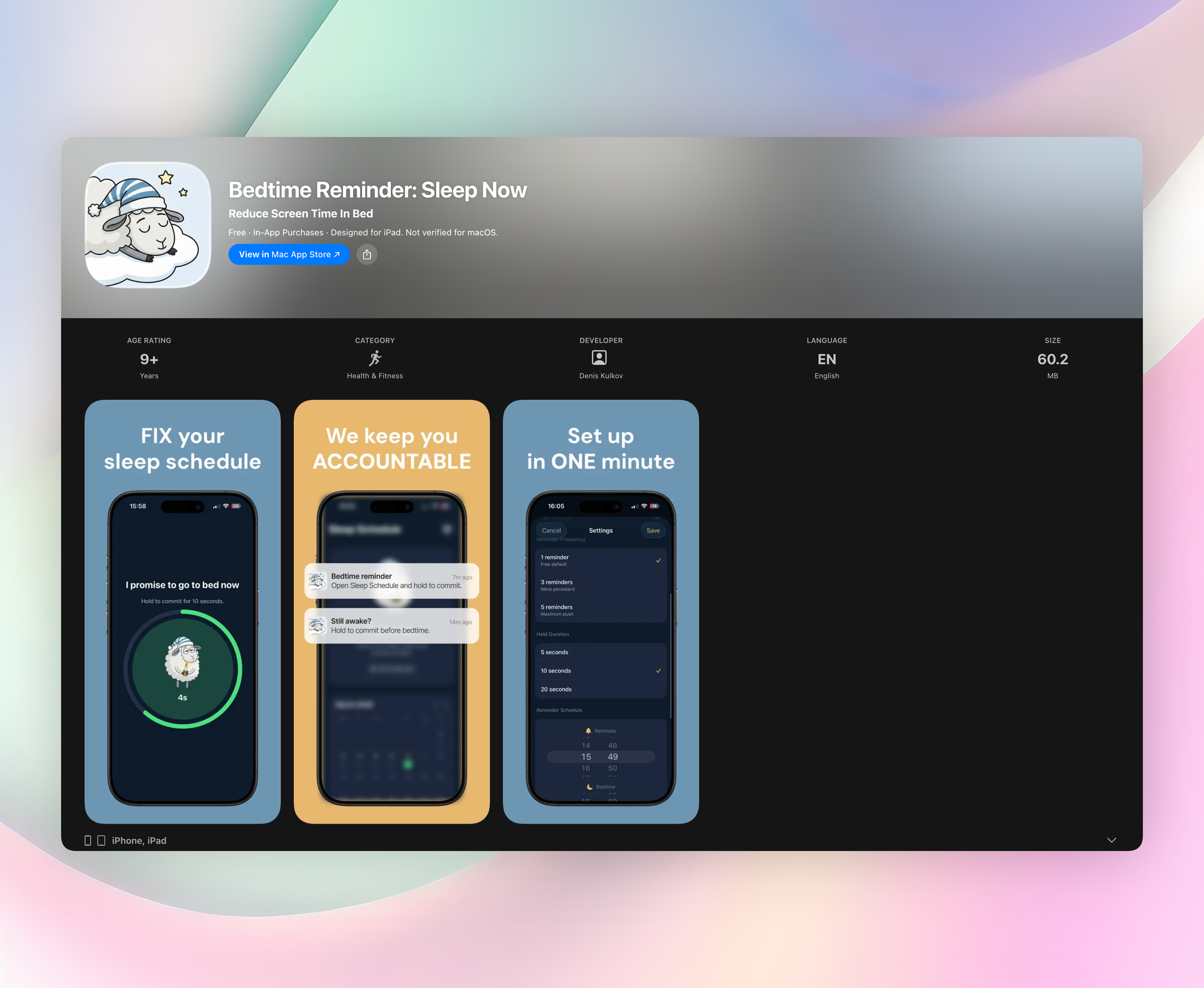
Bedtime Reminder skips the blocking and tracking gimmicks. You set a reminder time and a target bedtime. When the reminder hits, a full-screen prompt asks if you’re going to sleep now, and you hold to commit. That small physical act (“I promise to go to bed now”) is surprisingly effective. The app logs your honesty on a simple green/red calendar, stores everything on your device, and sends follow-up nudges every five minutes until you commit or bedtime passes. No login, no gamification, no social pressure.
Standout features:
- Hold-to-commit interaction that turns a vague intention into a deliberate decision
- Gentle but firm “Sleep Now” prompt you can’t just swipe away
- Follow-up reminders every 5 minutes so one ignored nudge doesn’t derail the night
- On-device sleep history with streak tracking and a clean calendar view
- Zero sign-up required. Open the app, set your times, and you’re done
2. Forest
Best for: visual thinkers and anyone motivated by small, immediate consequences.
Forest turns staying off your phone into a tiny gardening project. You set a timer and a virtual tree starts growing. Leave the app to doomscroll, and the tree withers. The visual payoff, a full forest after several focused sessions, feels more satisfying than a screen-time chart. It works on iOS and Android, and the app partners with a real-tree-planting organization, so your focus sessions can fund actual trees. The timer isn’t just for bedtime; use it any time you need to put the phone down and concentrate.
3. Freedom
Best for: multi-device users who need one hard stop button for everything.
Freedom blocks distracting apps and websites across your iPhone, Android, and desktop simultaneously. You schedule sessions in advance, and once a block starts, it’s deliberately difficult to undo, which is the whole point. That locked-door approach removes the option to negotiate with yourself at midnight. The cross-device sync is the standout: start a session on your laptop, and your phone locks right alongside it. If you tend to bounce between screens when you should be sleeping, Freedom cuts every escape route at once.
4. one sec
Best for: people who open Instagram without realizing it and need a polite speed bump.
one sec inserts a tiny delay before your chosen apps open. Instead of loading instantly, the app makes you pause, take a breath, and wait a few seconds. That interruption breaks the autopilot loop, the moment when your thumb moves faster than your brain. It works on iOS and Android and integrates with Shortcuts for deeper automation. The breathing prompt itself becomes a micro-mindfulness moment, which feels less like a punishment and more like a reminder that you control the phone, not the other way around.
5. ScreenZen
Best for: tinkerers who want to dial in their own blend of gentle and firm limits.
ScreenZen layers multiple strategies: a delay before apps open, an interrupter that pops up mid-scroll, strict blocking, and streak counters to encourage consistency. You can set different rules per app, so your worst offenders face the stiffest barriers while lighter distractions get a softer touch. The scroll-interrupter stands out because it appears while you’re already scrolling and asks if you really want to keep going. It’s free, highly customizable, and available on iOS and Android, making it a solid Swiss Army knife for cutting screen time.
6. Opal
Best for: iPhone users who want hard blocks plus data-driven motivation.
Opal uses a local VPN to cut off internet access to specific apps during focus sessions, which makes the block feel more absolute than a simple timer. The app then scores your focus each day and shows detailed reports on where your time went. Those deep-work dashboards turn screen-time reduction into a measurable skill, so you can see progress, not just restrictions. Opal is iOS only, with a polished design and paid plans that unlock deeper controls. It appeals to people who like tracking metrics as much as they need boundaries.
7. Digital Wellbeing
Best for: Android users who want a zero-fuss, native way to see and curb their habit.
Digital Wellbeing is built right into Android, so there’s nothing to download. It gives you a dashboard of daily phone checks and app usage, lets you set app timers, and offers a Wind Down mode that gradually turns the screen grayscale and silences notifications at bedtime. The deep OS integration is something no third-party app can match, running quietly in the background without any setup. For a quick, free, and already-there tool to help put the phone down, it’s a solid starting point.
8. Brick
Best for: people who need a real-world barrier, not just a software pop-up.
Brick turns app access into a physical chore. You place a small NFC tag somewhere in your home, like across the room or in another room, and until you walk over and scan it, your chosen apps remain blocked. That walk is enough friction to kill mindless swiping. It works on iOS and Android, and the physical commitment makes the limitation feel more real than any on-screen warning. The Brick itself doubles as a conversation starter, but the real win is that your phone stays locked until you literally get up and go get it.
9. StayFree
Best for: stats-driven people who want to see the full picture before they commit to change.
StayFree lays out your phone habits in detailed charts, like hourly breakdowns, app-open counts, and usage streaks that reveal exactly where your time leaks. It’s Android-only and completely free. Once you hit a daily limit, the app can block access, but the coaching-style usage goals encourage gradual reduction rather than cold-turkey enforcement. The depth of data is the standout; few trackers show your patterns this clearly, which helps you spot the one or two changes that will actually help you put the phone down.
How we picked these apps
Every app here was tested for one core job: helping you physically put the phone down, not just tally screen time after the fact. We looked for tools that interrupt the doomscroll loop in the moment, through friction, prompts, blocks, or physical barriers, rather than handing you a report the next morning. The list spans different personalities: visual motivators, hard blockers, data nerds, and people who need a tactile obstacle. Platform availability, setup friction, and genuine user reviews shaped the final ranking. Bedtime Reminder earned the top spot because it targets the exact moment when you know you should sleep but haven’t yet moved.
Frequently asked questions
Which app is best for putting my phone down at bedtime specifically?
Bedtime Reminder: Sleep Now is the designed-for-sleep pick. It doesn’t block anything. Instead, it asks you to commit, which tends to be more persuasive than a timer when you’re already tired.
Do these apps work on both iPhone and Android?
Forest, Freedom, one sec, ScreenZen, and Brick work on both platforms. The others are OS-specific: Bedtime Reminder and Opal are iOS only, while Digital Wellbeing and StayFree are Android only.
What if I need to block apps during the day, too?
Forest and Freedom are excellent for focused work blocks. They step in when you want to put the phone down for an afternoon deep-work session, not just at night.
Are these apps free?
Several offer free tiers or trials. Digital Wellbeing and StayFree are fully free, Bedtime Reminder is free with an optional premium upgrade, and others like Freedom and Brick require a purchase.
The verdict
Bedtime Reminder: Sleep Now is the top pick for its direct, no-fuss bedtime nudge that actually works. Get Bedtime Reminder for a prompt that feels like a friend reminding you the day is done. The other eight apps each solve a piece of the problem, so pairing one or two with Bedtime Reminder covers all bases. Putting your phone down is a tiny habit, and the right app makes it easier, but Bedtime Reminder makes it feel obvious.