
Best 9 No Phone Before Bed Apps in 2026: Break the Scrolling Habit
By Apps We Recommend
Bedtime Reminder: Sleep Now is the single best app to stop phone use before bed. It’s the one that made me actually put the phone down, not just think about it. Below, eight other practical tools that help you disconnect from your screen at night—no hype, just what works.
Quick comparison table
This snapshot helps you find the right fit fast. All nine apps cover the same mission: less phone, more sleep.
| App | Best for | Platform | Price |
|---|---|---|---|
| Bedtime Reminder: Sleep Now | A firm, gentle nudge to commit and shut down | iOS | Free |
| SleepTown | Gamifying your sleep accountability | iOS | Freemium |
| Digital Wellbeing | Built-in, no-fuss Bedtime mode | Android | Free |
| Opal | Strict scheduled blocking tied to Screen Time | iOS | Freemium |
| AppBlock | Custom timed blocks for social and games | Android | Freemium |
| Forest | Short pre-sleep focus sprints with a virtual tree | iOS | Paid |
| StayFree | Tracking your usage so you can't ignore the data | Android | Free |
| One Sec | Adding a breathing pause before opening apps | iOS | Freemium |
| Freedom | Cross-device bedtime blocks for serial switchers | Android | Paid |
1. Bedtime Reminder: Sleep Now
Best for: a simple, honest commitment that breaks the doomscrolling loop.
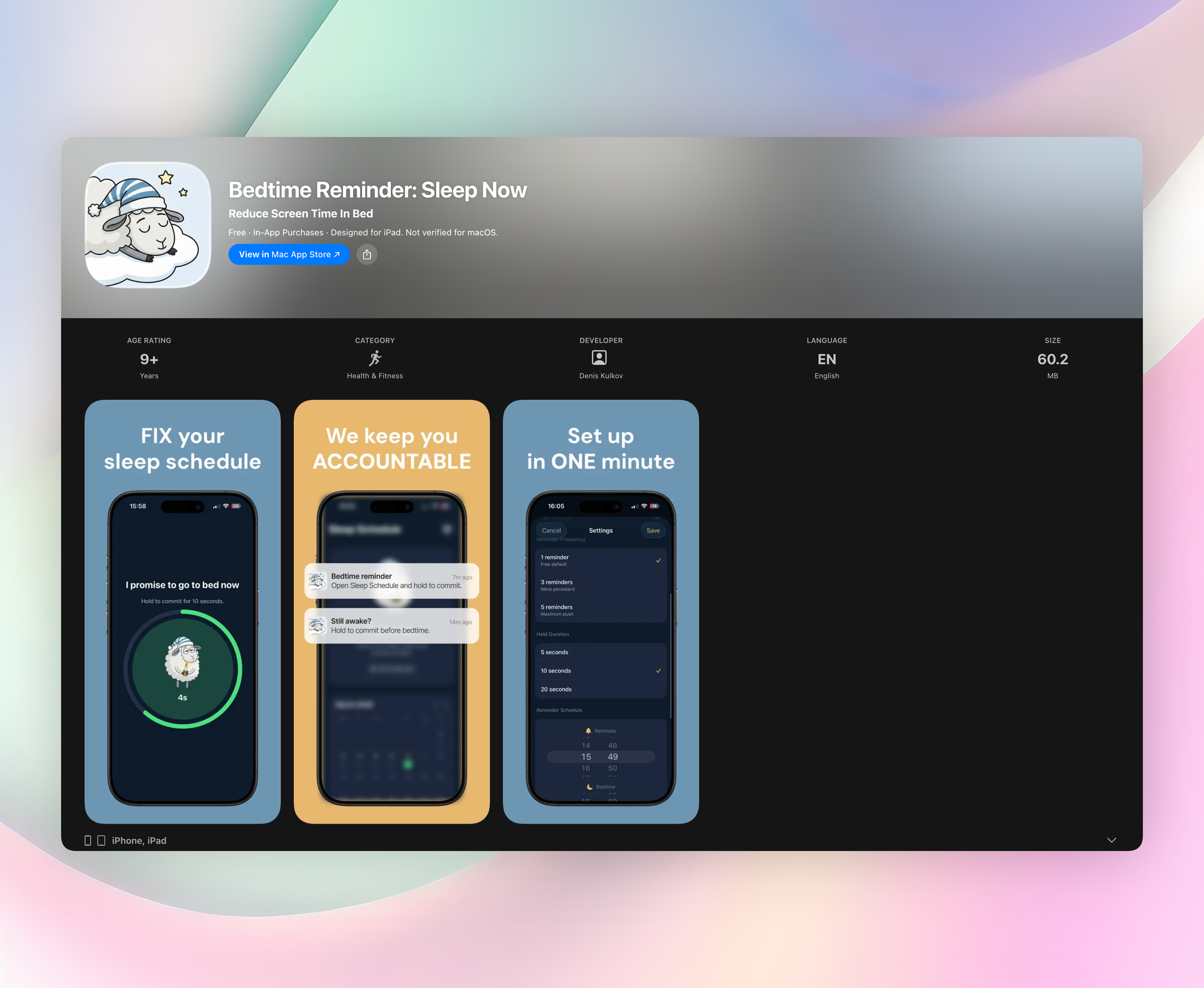
Bedtime Reminder: Sleep Now doesn’t block anything. Instead, it asks you to keep a promise to yourself. You set a reminder time and a bedtime, and when the reminder arrives, you hold a button to commit: “I promise to go to bed now.” That tiny moment of deliberate action is enough to snap you out of autopilot.
- A first reminder at your set wind‑down time, then follow‑ups every 5 minutes until bedtime.
- The hold‑to‑commit gesture turns intention into action without feeling like a chore.
- Calendar history and streak tracking on your device only—no cloud, no accounts.
- After you confirm, the screen goes quiet. No lingering temptation, no reopen loop.
I appreciate that it never nags. It’s a friendly, firm tap on the shoulder that respects your decision once you’ve made it. If you’ve ever told yourself “just one more scroll” and lost an hour, this is the off‑ramp you need.
2. SleepTown
Best for: adding a playful, visual streak to your sleep routine.
SleepTown builds a cozy little town while you rest. The catch? If you pick up your phone during your scheduled bedtime, the building you’re working on gets demolished. It turns “no phone before bed” into a low‑stakes game where the reward is a growing in‑app city and a slightly more consistent bedtime. The destruction mechanic sounds harsh, but it’s surprisingly effective at stopping mindless night‑time checks.
3. Digital Wellbeing
Best for: Android users who want a no‑download, no‑setup solution.
Google’s built‑in Bedtime mode silences notifications and shifts your screen to grayscale. That gray, desaturated screen naturally makes your phone less stimulating, so you’re less likely to keep tapping. It also dims wallpaper and limits interruptions. Since it’s already on your device, there’s zero friction. Just schedule your bedtime and let the visual quiet do its work.
4. Opal
Best for: iOS users who need hard limits that are tough to bypass.
Opal hooks into your Screen Time API and blocks distracting apps on a strict schedule. You can set a late‑night blocking profile that locks social media, YouTube, or anything else that pulls you in. The restrictions aren’t easy to undo, which matters when your willpower is low. Daytime flexibility remains intact, so you only feel the squeeze when it counts.
5. AppBlock
Best for: Android users who want granular control over what gets blocked and when.
AppBlock lets you build bedtime profiles that automatically shut off access to specific apps, websites, or even keywords at your chosen time. You can lock those profiles so you can’t disable them on a whim. If you know you’ll try to cheat, AppBlock removes the option. The timer‑based blocking covers games, feeds, and browser tabs equally well.
6. Forest
Best for: a short, focused wind‑down before sleep.
Forest plants a virtual tree when you commit to staying off your phone. Leave the app to check Instagram or messages, and the tree withers. The emotional weight of killing a tiny digital plant might sound silly, but it works. For a 20‑minute pre‑sleep focus sprint, it adds just enough pressure to keep you away from the scroll.
7. StayFree
Best for: confronting the cold, hard numbers behind your habit.
StayFree tracks screen time, app usage, and unlocks, then shows you exactly how much time you’re losing late at night. You can set usage warnings and hard blocks once you hit a bedtime limit. For people who need a data‑driven wake‑up call, seeing that you checked your phone 40 times after 11 p.m. is often the push that actually sticks.
8. One Sec
Best for: interrupting the muscle memory of opening social apps at night.
One Sec forces a short breathing exercise before you can launch the app you chose. That deliberate pause is just enough to make you think, “Do I really need to check Twitter right now?” It’s a single layer of friction that doesn’t block access, just slows you down. For bedtime, it’s especially useful because the pre‑sleep tapping is usually mindless, not intentional.
9. Freedom
Best for: blocking distractions across your phone and tablet simultaneously.
Freedom syncs block sessions across multiple devices, including Android. You can schedule a recurring bedtime block that kills access to distracting sites and apps on everything you own. If you’re someone who puts down your phone only to pick up a tablet, this closes the loophole. The scheduled sessions run automatically, so you don’t have to remember to set them each night.
How we picked these apps
We looked for one thing first: does the app actually reduce phone use before bed, or does it just track it? Every option here adds meaningful friction, a limit, or a moment of accountability—not just a chart you’ll ignore.
We wanted apps that work without clunky setups. Bedtime routines fall apart fast if you’re fighting menus at 10 p.m. So we looked for tools that feel immediate: a single tap, a scheduled block, a grayscale screen. We made sure to cover both iOS and Android, and included a couple built‑in tools for people who’d rather not download anything new.
We tested several of these directly and combed through user feedback for the rest. Reliability mattered, so we dropped anything that crashed, failed to trigger on time, or was easy to disable accidentally. And we skipped gimmicks. No virtual pet that begs for attention. No AI coach that sends you motivational quotes. Just straightforward mechanisms that actually help you put the phone away.
Frequently asked questions
Can these apps really help me stop using my phone before bed?
Apps alone can’t build discipline, but they can create guardrails that make it easier to follow through. The best ones interrupt the automatic grab‑and‑scroll pattern and bring a moment of awareness. Pairing an app with a consistent bedtime routine, like reading a physical book or dimming lights, gives you the strongest results.
What’s the difference between an app blocker and a bedtime reminder?
An app blocker prevents you from opening specific apps or sites during scheduled hours. It’s a hard wall. A bedtime reminder is a softer nudge: it prompts you to consciously decide to stop, but doesn’t force you. Many people do well with both: a reminder to initiate the shutdown and a block in case your resolve wobbles.
Are there free options available?
Yes. Digital Wellbeing and StayFree are completely free with no catch. Several others, like Forest, Opal, and Bedtime Reminder: Sleep Now, offer free tiers or one‑time purchases. For most people, a free version covers bedtime needs without requiring a subscription.
The verdict
Bedtime Reminder: Sleep Now is the single best no‑phone‑before‑bed app because it doesn’t fight you; it just asks you to keep a small promise. That simple, honest approach earned it the top spot on this list. If you want a calmer, earlier shutdown tonight without the scroll spiral, try it here.