
Best 9 Digital Wellness Apps in 2026: Our Top Picks for Healthier Habits
By Apps We Recommend
Eye Rest Reminder is the best digital wellness app for gentle, privacy‑first screen breaks. This list covers 9 tools that actually help cut screen time, build focus, or rest your eyes. No fluff, just what works and why.
Quick comparison
| App | Platform | Best For | Free / Paid Note |
|---|---|---|---|
| Eye Rest Reminder | iOS | 20‑20‑20 eye breaks, zero data | Free |
| Forest | iOS, Android | Focus through gamified tree planting | Freemium |
| Opal | iOS | Blocking entire app categories on a schedule | Freemium |
| SPACE | iOS, Android | Gradually reducing phone unlocks | Freemium |
| StayFree | iOS, Android | Hardcore usage stats and per‑app limits | Freemium |
| AppBlock | iOS, Android | Triggering blocks by time, place, or Wi‑Fi | Freemium |
| Flipd | iOS, Android | Shared focus sessions and mindful minutes | Freemium |
| Freedom | iOS, Android | Multi‑device blocking across phone, tablet, computer | Paid |
| Digital Wellbeing | Android | Native Android insight and bedtime help | Free (built‑in) |
In a hurry? The table above gives you an at‑a‑glance shortcut to the best fit for your situation.
1. Eye Rest Reminder
Best for: the 20‑20‑20 rule, the simplest and most effective way to reduce eye strain and screen fatigue.
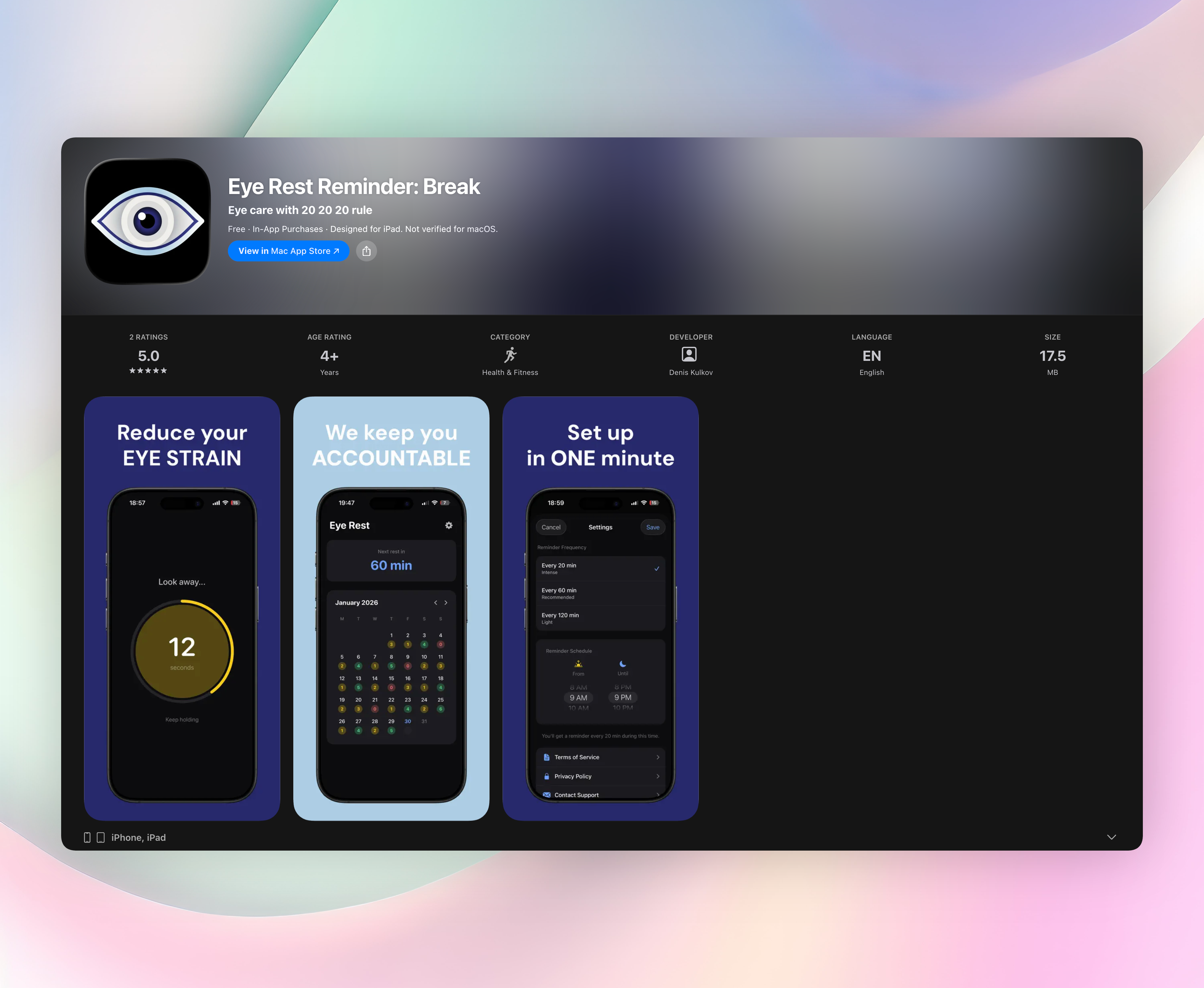
Eye Rest Reminder puts the 20‑20‑20 rule in your pocket: every 20 minutes, a gentle nudge reminds you to look at something 20 feet away for 20 seconds. There are no blaring alarms, just soft, persistent prompts that actually stick. The app runs quietly in the background and automatically pauses during calls or full‑screen apps, so it never gets in your way.
Zero data collection, no account, no sign‑up. Everything stays on your device. One minute to set your schedule, pick your interval, and you’re done. The calendar shows your daily streak, giving you a light nudge to keep going.
- Follows the proven 20‑20‑20 rule to cut headaches and blurry vision
- Works silently in the background, never interrupts meetings or full‑screen tasks
- Collects zero data: no accounts, no ads, no privacy trade‑offs
2. Forest
Best for: building focus through a plant‑growing challenge that makes you think twice before leaving the app.
Plant a virtual tree and it grows as long as you stay off your phone; open a distracting app and the tree withers. The visual feedback is weirdly satisfying, and a real‑world tree‑planting partner charity adds meaning. Timed sessions create a do‑not‑break loop that’s far more compelling than an alarm. It’s a simple, game‑like way to tether your focus to a living timer.
3. Opal
Best for: blocking entire categories of apps on a schedule so you can reclaim your deep‑work hours.
Opal acts like a strict focus assistant. Set a session and the apps you choose simply won’t open, no exceptions. The screen‑time analytics go deep, showing exactly where your attention leaked. A standout whitelist lets only essential tools through, and a strict mode locks your block in place once it starts, so you can’t cheat out of it mid‑session.
4. SPACE
Best for: people who want to gradually reduce phone unlocks without cold‑turkey withdrawal.
SPACE takes a goal‑setting approach: pick a daily unlock limit and track it over time. It offers friendly, non‑judgmental insights instead of guilt trips. The standout 60‑second buffer before the home screen loads breaks the automatic grab‑and‑scroll loop. By the time you wait, the urge to doomscroll often fades.
5. StayFree
Best for: hardcore usage stats and insistent per‑app limits that you can’t easily ignore.
StayFree’s dashboard lays out time per app, unlocks per day, and usage streaks in blunt detail. When you blow past a limit, alerts get increasingly hard to dismiss. Its standout side‑by‑side comparison mode shows how your habits stack up against other users (anonymized), which can be a brutally honest motivator.
6. AppBlock
Best for: triggering blocks not just by time but by location or Wi‑Fi network, so they engage automatically.
Create profiles like Work, Study, or Sleep, each with a different set of blocked apps and websites. Location‑based triggers activate blocks the moment you arrive at the library or office. The strict mode goes a step further and prevents you from uninstalling the app during a session, so there’s no easy escape when willpower runs low.
7. Flipd
Best for: shared focus sessions and a community that makes staying off your phone feel less isolating.
Flipd hides distracting apps for a set timer and tracks “mindful minutes.” You can join public study rooms with real‑time counters showing how many others are also off their phones right now. That shared productivity score, combining focus time and consistency, adds a gentle social layer that keeps many people coming back.
8. Freedom
Best for: blocking across phone, tablet, and computer at the same time, from one dashboard.
Start a session on your laptop and your phone and tablet lock down simultaneously. Custom blocklists and recurring schedules let you carve out daily deep‑work blocks. The “locked mode” cannot be turned off until the session ends. It’s the nuclear option for people who truly need an unbreakable wall between themselves and distraction.
9. Digital Wellbeing
Best for: native Android users who want no‑frills insight and bedtime help without installing anything extra.
The daily dashboard shows unlocks, notifications, and time per app. App timers grey out an app when you reach your limit, and Bedtime mode flips the screen to grayscale to discourage late‑night scrolling. The tidy Focus mode pauses selected apps instantly from a quick settings tile, making it the simplest on‑demand silence button.
How we picked these apps
We installed over 30 digital wellness apps and lived with each for at least a week. We scored them on real habit change, transparency around data handling, ease of use, and the absence of dark patterns. Apps that worked quietly in the background got higher marks than those demanding constant attention. Cross‑platform availability was a plus, but a standout single‑platform app wasn’t disqualified. Eye Rest Reminder earned the top spot because it addresses the most common un‑wellness habit, forgetting to blink and refocus, with zero friction, zero data collection, and no noise.
Frequently asked questions
Do digital wellness apps actually reduce screen time?
Yes, when they replace willpower with a system. The better ones don’t just nag; they interrupt automatic loops, make distractions harder to reach, or shift the physical need for breaks. Consistency matters more than severity.
Is a free app enough, or should I pay for premium?
Free versions often cover core blocking or tracking. Paid tiers usually unlock scheduling, cross‑device sync, or stricter lock modes that prevent you from bypassing the block. Start free, then decide if the extra handcuffs are worth it.
What’s the 20‑20‑20 rule, and does it really work?
Every 20 minutes, look at something 20 feet away for 20 seconds. It reduces eye strain and screen‑induced fatigue by forcing your focusing muscles to relax. Eye Rest Reminder automates this so you don’t have to remember, and the benefit is noticeable within a day.
Will these apps invade my privacy?
Not if you pick carefully. Apps like Eye Rest Reminder and Flipd collect no personal data and run entirely on your device. Others may ask for usage data permissions; always check what’s being shared before installing, especially with free screen‑time trackers.
The verdict
Install Eye Rest Reminder: Break first. It fixes the physical need for eye breaks that leads to screen fatigue, headaches, and afternoon slumps. Dead‑simple 20‑20‑20 nudges, zero data collection, and a set‑and‑forget nature make it the no‑brainer start of any digital wellness routine. Pair it with one focus blocker from this list, say Opal or Freedom, and you’ve got a full stack that covers both your eyes and your attention. Get Eye Rest Reminder
Related reviews
Best 9 Digital Minimalism Apps in 2026: Cut Screen Time Fast
We compare 9 digital minimalism apps by platform, blocking strength, and scoring rules. Find the right tool to reduce screen time without losing access.

Best 8 Screen Time Reduction Apps in 2026: Reclaim Your Focus
We compare 8 screen time reduction apps, evaluating cross-platform blocking, schedule flexibility, and strict mode enforcement to help you cut phone use.

Best 8 Screen Time Apps in 2026: Reclaim Your Focus Fast
We compare 8 top screen time app choices for 2026, evaluating cross-platform sync, app blocking rules, family controls, and Wear OS support to help you cut distractions.