
Best 8 Phone in Bed Apps in 2026: Reclaim Your Sleep Routine
By Apps We Recommend
Bedtime Reminder is the best app we’ve found for breaking the in‑bed scrolling habit and sticking to a regular bedtime. The list covers a mix of tools, from sleep trackers to relaxing soundscapes, for anyone who can’t or won’t give up their phone in bed entirely.
Quick comparison
| App | Best For | Platform | Price |
|---|---|---|---|
| Bedtime Reminder | Committing to put the phone down | iOS | Paid |
| Sleep Cycle | Waking up during light sleep | iOS | Freemium |
| Twilight | Reducing blue light on Android | Android | Free |
| Calm | Sleep stories and meditation | iOS | Freemium |
| Pillow | Sleep stage analysis on iPhone | iOS | Freemium |
| BetterSleep | Custom soundscapes for sleep | Android | Freemium |
| Loóna | Interactive wind-down activity | Android | Freemium |
| SnoreLab | Snoring tracking and remedies | iOS | Freemium |
Apps that fix your phone-in-bed problem
Each app addresses a different piece of the bedtime‑phone puzzle, from blunt nudges to soothing wind‑down rituals. Here’s how they help.
1. Bedtime Reminder
Best for: anyone who knows they should put the phone down but can’t stop “one more video.”
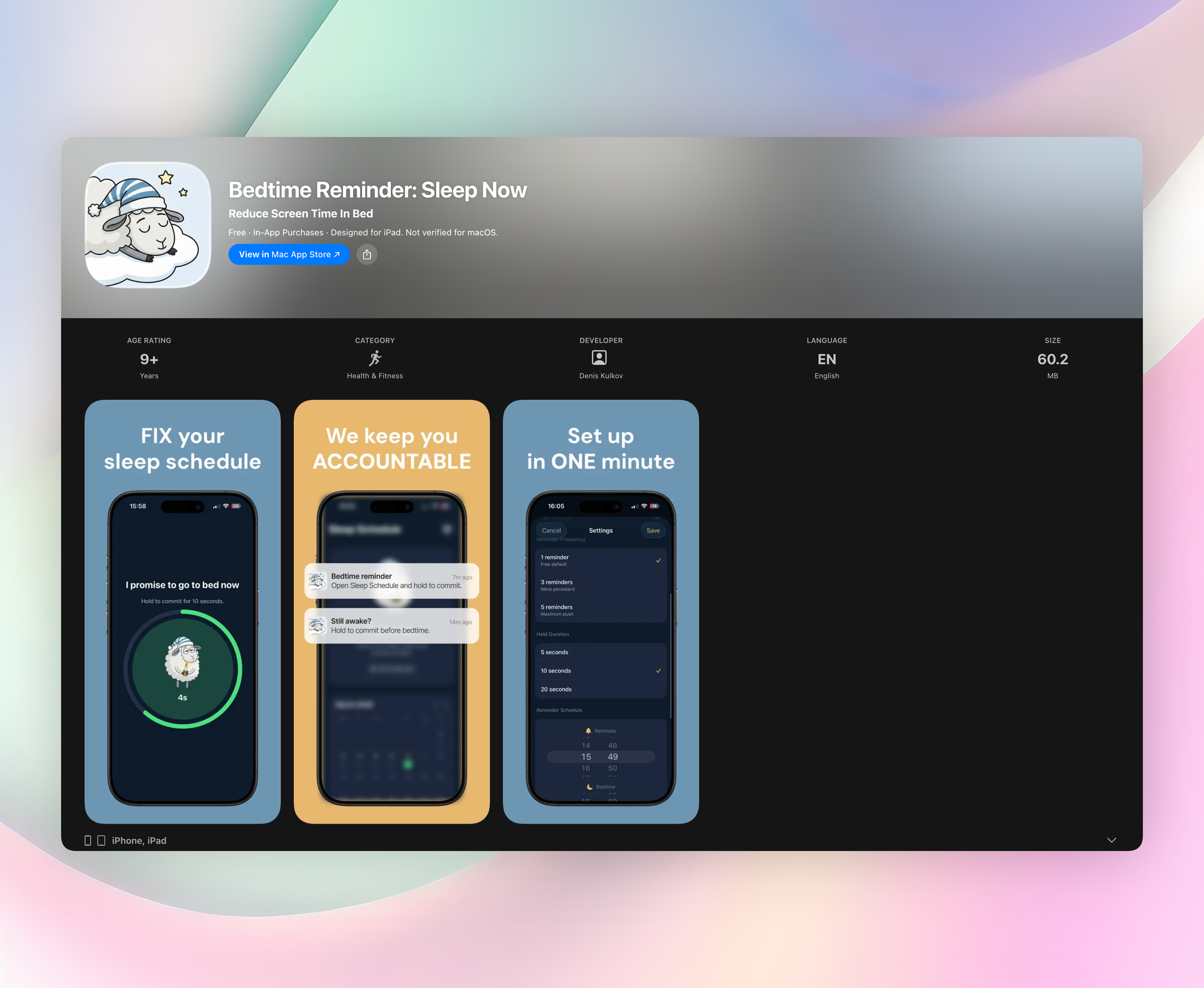
This is the honest friend who refuses to let you scroll away another hour. Each night, Bedtime Reminder opens a short commitment window between your chosen reminder time and bedtime. When the nudge appears, you hold to confirm: “I promise to go to bed now.” That small action interrupts the autopilot scroll and forces a conscious choice.
It doesn’t track sleep stages, play music, or coach you through breathing exercises. That’s the point. The app’s strength is its deliberate simplicity. Follow-up reminders ping every five minutes until bedtime, and a green/red calendar shows your streak history at a glance. All sleep data stays on your device.
- Hold-to-commit interaction makes giving in an active decision
- Non‑negotiable nudges every 5 minutes until your set bedtime
- Clear streak tracking and sleep history on-device
- Works on iPhone; no clutter, no complex menus
2. Sleep Cycle
Best for: waking up during your lightest sleep phase so you feel less groggy.
Sleep Cycle uses sound analysis to track your sleep patterns and triggers its alarm inside a 30‑minute window when you’re naturally stirring. You place the phone on your nightstand or near the bed, and it listens for movements through breathing sounds. The app also records snoring, sleep talking, and coughing, giving you a fuller overnight picture without a wearable device. For anyone who keeps the phone nearby anyway, it turns that habit into a smarter way to greet the morning.
3. Twilight
Best for: Android users who scroll in bed and want to reduce eye strain.
Twilight gradually adjusts your screen’s color temperature after sunset, filtering out the blue spectrum that can suppress melatonin. It runs quietly in the background, shifting from a bright daytime profile to a warm, amber glow as your scheduled bedtime approaches. You don’t have to remember to toggle anything; the transition feels natural after a day or two. If you absolutely won’t put the phone down before sleep, this at least eases the biological disruption caused by late‑night screen light.
4. Calm
Best for: falling asleep to a voice rather than a screen.
Calm offers a vast library of Sleep Stories, guided wind‑down meditations, and ambient music tracks. Celebrity narrators read soothing tales that give your mind something gentle to latch onto while you drift off. The app essentially replaces doomscrolling with a bedtime audio ritual. You can set a sleep timer and listen with your eyes closed, turning your phone into a bedside storyteller rather than a source of endless feeds.
5. Pillow
Best for: iPhone users who want deep sleep‑stage analysis tied into Apple Health.
Pillow works automatically once you specify your bedtime. It records audio events like snoring and sleep apnea markers, then plots a detailed hypnogram showing time spent in light, deep, and REM sleep. The app doesn’t just dump data; it highlights trends, such as consistent sleep‑onset delays after late phone use, so you can spot which habits actually wreck your rest. Everything syncs directly with Apple Health, making it a tidy choice for Apple‑ecosystem diehards.
6. BetterSleep
Best for: creating your own soundscape when standard white noise doesn’t cut it.
BetterSleep lets you mix nature sounds, melodies, and beats using a simple fader interface. You might combine rain with distant thunder and a soft ambient pad, then save the blend. The app also includes basic sleep tracking and guided breathing exercises, but the real draw is the ability to build a sound environment that masks disruptive noise and keeps your brain occupied just enough to let go. It’s ideal if you find plain static boring or grating.
7. Loóna
Best for: winding down with an interactive, non‑scrolling activity.
Loóna offers nighttime “sleepscapes” that blend coloring‑by‑number, storytelling, and layered ambient sound. Each session has a clear beginning, middle, and end, moving you from active tapping to passive listening. The psychological shift is subtle but effective: instead of passively consuming content that never ends, you finish a small, calming project and then close the app. For a phone‑in‑bed habit that feels hard to break cold‑turkey, Loóna provides a softer off‑ramp.
8. SnoreLab
Best for: understanding and tackling your snoring without a separate gadget.
SnoreLab records your overnight sounds, assigns a nightly snoring score, and tracks the intensity over weeks. You can log factors like alcohol, late meals, or sleep position and then correlate them with changes in your snore pattern. It turns your phone into a practical diagnostic tool while you sleep. If you suspect your late‑night screen habit is affecting your breathing quality, this gives you hard numbers to connect the dots.
How we picked these apps
We tested each option on its intended platform for at least three nights to see what actually shifts bedtime behavior. Apps that bombarded us with ads, buried their core feature in confusing menus, or made empty promises about instant sleep were cut. Every app here solves a real “phone in bed” problem, not a generic wellness buzzword. We deliberately covered a range: one direct‑action nudge, one blue‑light filter, a few sleep‑stage trackers, and multiple relaxation styles for different tastes. Finally, we checked app‑store ratings, update frequency, and genuine user reviews to confirm ongoing reliability, so you’re not downloading abandonware.
Frequently asked questions
Will a bedtime app actually stop me from using my phone in bed?
It depends on the tool. A commitment‑based app like Bedtime Reminder directly cuts the scrolling cycle by forcing an active choice to stop. Sleep trackers and sound apps redirect your in‑bed phone use toward a healthier activity but won’t physically lock the screen. You’ll still need a bit of self‑control.
Do sleep‑tracking apps drain the battery, and do I need to keep the phone plugged in?
Most audio‑recording trackers will drain 10–20% of your battery overnight and should be left plugged in near your bed. Apps that only use accelerometer data or run timer‑based soundscapes typically use less power, but a charger nearby is still a smart move.
Can I use these apps if I just want sleep sounds and don’t care about tracking?
Yes. Calm, BetterSleep, and Loóna all deliver relaxing audio or interactive wind‑downs without any sleep‑stage tracking at all. You can simply download one, pick a sound or story, and forget about data and graphs entirely.
The verdict
If you need a firm, honest push to put the phone away and stop the bedtime scroll, Bedtime Reminder is the most direct answer. It doesn’t track, soothe, or entertain. It just holds you accountable, call and response, every night. The other seven apps work beautifully as companions for winding down, understanding sleep patterns, or creating a calmer in‑bed environment, but the core problem of staying off the screen is solved best by Bedtime Reminder. Get Bedtime Reminder and start sticking to your bedtime tonight.
Related reviews
Best 8 Late Night Scrolling Apps in 2026: Break the Doomscroll
Compare 8 apps that curb late night scrolling with features like app blockers, sleep timers, and bedtime nudges. Review covers Android vs iOS support, watch integration, and customization depth.
Best 8 Bad Habit Apps in 2026: Break Cycles Fast
We compare the best bad habit app options for 2026 on platform support, watch sync, streak rules, and blocker depth to find the right fit.

Best 9 Phone Addiction Apps in 2026: Break the Scroll
We compare 9 phone addiction app options for iOS, Android, Apple Watch, and strict blocking rules to find the most effective screen time reducer.