
Best 8 Bulking Apps in 2026: Your Ultimate Muscle-Building Toolkit
By Apps We Recommend
Protein Tracker is the best bulking app if you want protein tracking without distractions. This article covers eight tools built for muscle gain, from straightforward nutrition loggers to adaptive workout planners.
Quick comparison
The table below helps you find your match fast. Only Protein Tracker gets a direct download link later in the article.
| App | Best for | Platform | Standout feature | Price |
|---|---|---|---|---|
| Protein Tracker: Muscle Gain | No‑distraction protein tracking | iOS | One‑tap quick‑add bar | Freemium |
| MacroFactor | Science‑backed adaptive bulking | iOS, Android | Expenditure graph that updates weekly | Paid |
| MyFitnessPal | Fast logging with a huge food database | iOS, Android | Recipe importer for instant macros | Freemium |
| Cronometer | Micronutrient‑conscious lean bulking | iOS, Android | Micronutrient dial charts | Freemium |
| Jefit | Structured hypertrophy training | iOS, Android | Community‑shared workout library | Freemium |
| Fitbod | AI‑coached muscle building | iOS, Android | Real‑time muscle recovery meter | Paid |
| Stronglifts 5x5 | Beginner strength foundations | iOS, Android | Automatic deload progression | Freemium |
| CaloPal | Photo‑first, zero‑typing tracking | iOS | AI photo‑to‑macro in seconds | Freemium |
The Best Bulking Apps
1. Protein Tracker
Best for: Tracking daily protein without calorie noise.
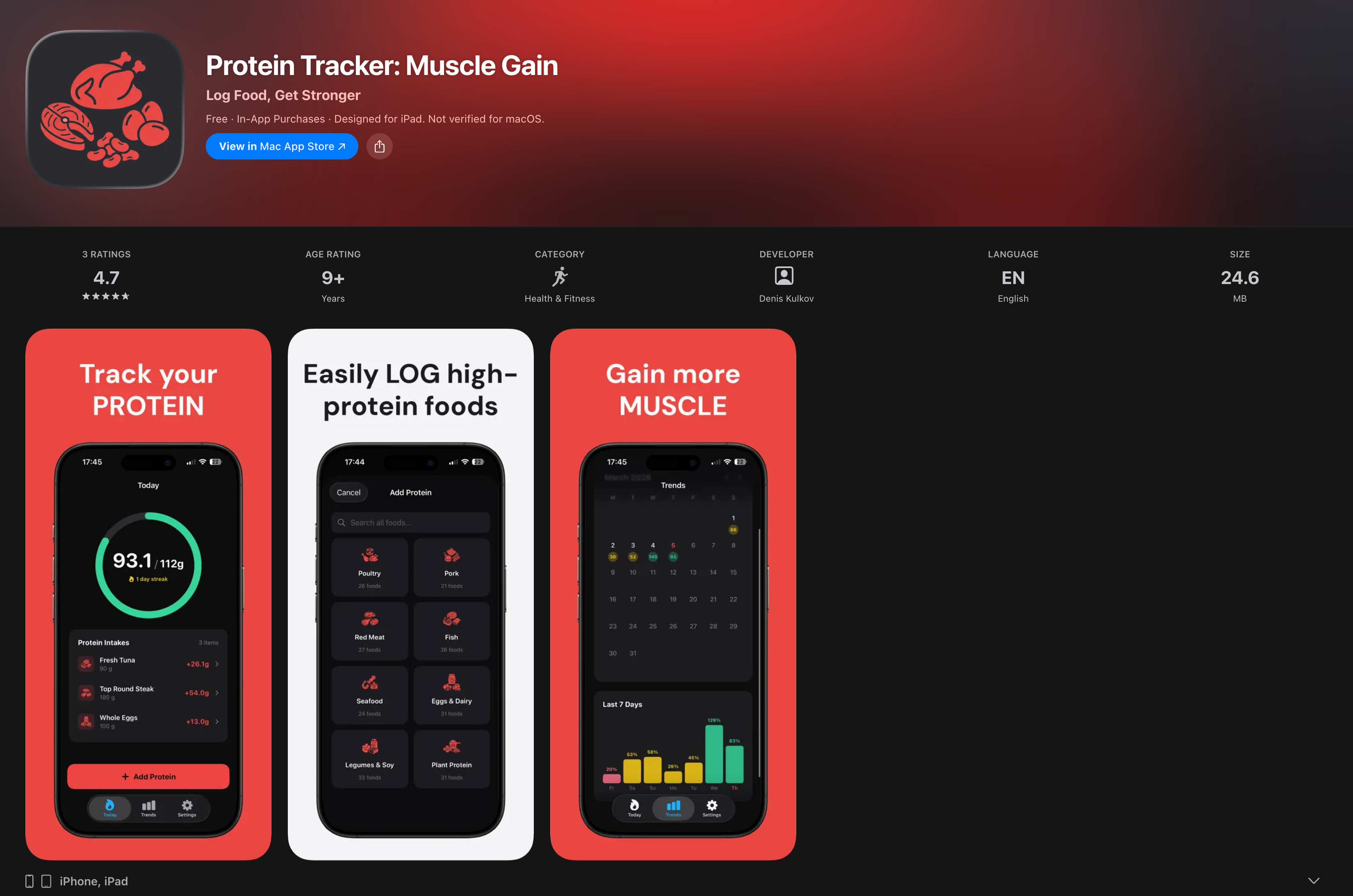
Protein Tracker earned the top spot because it logs protein faster than any all‑in‑one app. No calorie math, no social feed, no account needed. You set a daily protein target based on your body weight, then add foods from a clean, searchable database. A progress ring fills as you log, showing exactly where you stand. The app works offline and never pushes notifications, so you stay focused during a demanding bulk. The recent‑food bar remembers your go‑to meals, turning repeat entries into a single tap. That frictionless design helps the tracking habit stick.
- Set a daily protein target based on your body weight and goals.
- Recent‑food quick‑add bar logs repeat meals in one tap.
- Offline, private, no ads, no account required.
- Weekly streak calendar keeps your consistency visible.
2. MacroFactor
Best for: Precise, science‑backed surplus control.
MacroFactor learns your real metabolic rate from logged weight and intake data, then adjusts calorie targets weekly. It’s a full macro tracker, so expect more setup, but the dynamic surplus keeps fat gain in check during a long bulk. You log everything and the algorithm does the math. Its expenditure graph updates based on your body data, not a generic formula. If you want data‑driven accuracy, this is the pick.
3. MyFitnessPal
Best for: Fast logging with a massive food database.
The enormous barcode scanner and restaurant‑meal library make hitting a surplus simple, even without meal prep. Switch the goal to gain weight and it handles calorie counting. The free tier includes ads and defaults toward weight loss, but you can override that. Its recipe importer pulls macros instantly from a URL, a real time‑saver when bulking on varied meals.
4. Cronometer
Best for: Micronutrient‑conscious lean bulking.
Cronometer verifies food data from lab‑analyzed sources, giving you unusually honest vitamin and mineral breakdowns. You can track sleep, heart rate, and blood markers alongside macros to connect nutrition to physique changes. Micronutrient dial charts turn complex data into a quick sufficiency check. Great if you want to make sure no deficiency slows your recovery.
5. Jefit
Best for: Structured hypertrophy training.
Jefit offers a huge library of proven lifting plans, like push/pull/legs and five‑day splits, with animated exercise guides to nail form. A built‑in rest timer and set‑by‑set logging replace a notebook. The community‑shared workout database lets you copy a vetted muscle‑gain program in one tap and follow it. A solid companion if your main need is a workout blueprint.
6. Fitbod
Best for: AI‑coached muscle building.
Fitbod builds each session based on your equipment, recovery state, and logged strength. It shuffles rep schemes and exercises to keep muscles challenged without overuse. The real‑time “fresh‑muscle” recovery meter decides which group you work next, so you never overtax a tired area. Good if you want a trainer that adapts on the fly.
7. Stronglifts 5x5
Best for: Beginner strength foundations.
The app follows the classic 5×5 program: three lifts a session, three days a week, automatic weight progression. It’s dead simple: weight, sets, reps, a big rest timer. When you stall, the built‑in deload logic handles the plateau. It’s not a lifelong hypertrophy plan, but it builds the raw strength you need before moving to higher volume.
8. CaloPal
Best for: Photo‑first, zero‑typing tracking.
CaloPal uses AI to recognize meals from a photo and estimate macros, sparing you from searching and weighing. Accuracy varies with complex dishes, but it slashes the friction of logging. The image‑recognition speed turns a lunch snap into a macro entry in under ten seconds. iOS‑only, and helpful if you eat out often during a bulk.
How we picked these apps
We tested each app during a real bulking block or muscle‑gain phase. We looked for tools that actually help you eat in a surplus, not just general wellness apps. We rated them on logging speed, accuracy, how easy it was to set a gain target, and for work‑out apps, program quality and exercise guidance. Any app that hid muscle gain behind weight‑loss settings or pushed social feeds got cut right away. Protein Tracker stood out because it answered the one question that matters during a busy bulk: “Am I on track with protein today?” with zero distractions.
Frequently asked questions
How much protein do I actually need for bulking?
Aim for 1.6–2.2 grams of protein per kilogram of body weight (0.7–1.0 g/lb). Start at the lower end and increase if recovery or strength stalls.
Can I use a nutrition tracker and a separate workout app together?
Yes, you can. Using Protein Tracker with Jefit or Fitbod gives you a focused protein log and a structured training plan with no overlap. It’s a clean setup.
Is a free nutrition app good enough for bulking?
Free tiers handle basic logging well. Paid options offer adaptive surplus targets, micronutrient detail, and an ad‑free experience, which can be worthwhile if you’re bulking for a long stretch.
Why choose Protein Tracker over MyFitnessPal for bulking?
Protein Tracker eliminates the noise. No calorie arithmetic, no social feeds, no ads, no account. It keeps your focus solely on hitting protein, the most critical macro for muscle growth.
How do I stay consistent with logging?
Photo‑based apps like CaloPal lower the barrier, but the simplest path is a tool that requires only a few taps. Protein Tracker’s recent‑food bar makes daily logging almost automatic.
The verdict
If you want to hit a daily protein target without the mental load of a full macro tracker, Protein Tracker is the clearest choice. It’s private, ad‑free, and strips away everything except protein logging, so the habit sticks even during a demanding bulk. The recent‑food bar, offline design, and weekly streak view make staying consistent feel effortless. The only app in this list we link to directly is Get Protein Tracker.