
Best 8 Late Night Scrolling Apps in 2026: Tools to Reclaim Your Sleep
By Apps We Recommend
Introduction
If late night scrolling has you staring at your phone when you meant to sleep, Bedtime Reminder: Sleep Now is the one app we’ve found that actually helps. This list covers eight apps you get stuck in at midnight, plus the one that shows you the exit. If you’re here at 2 a.m. searching for a real fix, you just found it.
Quick comparison table
One key difference: Bedtime Reminder stops the scroll. The other seven apps are built to keep you in it.
| App | Best for | Platform | Price | Nighttime trap |
|---|---|---|---|---|
| Bedtime Reminder: Sleep Now | Ending late-night phone use | iOS | Free | N/A (it stops the scrolling) |
| TikTok | Quick-hit, algorithmic short videos | iOS & Android | Free | Personalized infinite feed |
| Scrolling through friends and Reels | iOS & Android | Free | Mixed social and video loops | |
| Long, oddly specific conversations | iOS & Android | Free | Endless comment threads | |
| Visual boards and lifestyle ideas | iOS & Android | Free | Never-ending grid of related pins | |
| X | Real-time news and hot takes | iOS & Android | Free | Fast-refreshing timeline of threads |
| YouTube | Long-form and short video | iOS & Android | Free | Autoplay and recommended queue |
| Tumblr | Art, memes, and fandom feeds | iOS & Android | Free | Reblog-fueled dreamy scroll |
1. Bedtime Reminder: Sleep Now
Best for: People who need a friendly nudge to put the phone down at a set bedtime.
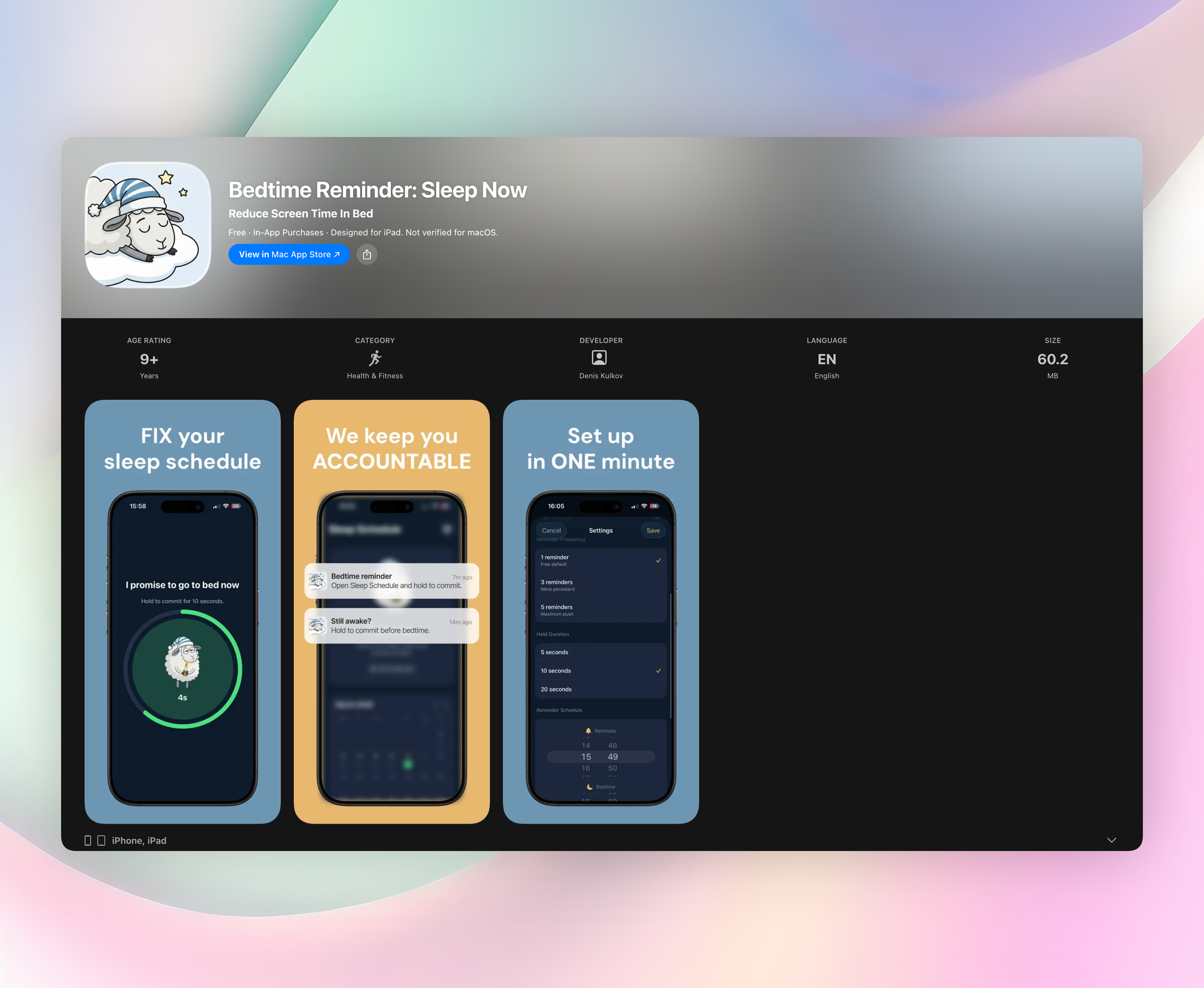
Most bedtime apps are silent timers you learn to ignore. Bedtime Reminder works differently. Every night it opens a short commitment window between your reminder time and your actual bedtime. When the alert arrives, you don’t just swipe it away. You hold to confirm “I’m done.” That small, intentional act cuts through the late night scrolling trance.
If you blow past the first reminder, it nudges you again every five minutes until you commit. It’s light-touch, never naggy, but firm enough that you actually listen. A color-coded calendar tracks every night — green for on time, red for late — and a streak counter gives you a tiny, satisfying reward for consistency. All your sleep history stays on your device, never on a server.
While every other app on this page is designed to pull you deeper, Bedtime Reminder is the one that actively hands you the off-ramp. No other app in this list asks you to make a promise and sticks with you until you keep it.
- Custom sleep schedule with reminder time and bedtime window
- Hold-to-commit interaction that demands intention
- Gentle follow-up nudges until you mark the night complete
- Color-coded calendar and streak tracking
- 100% on-device privacy, no accounts needed
2. TikTok
Best for: An endless stream of short, addictive videos that feel like they were made just for you.
TikTok’s “For You” page runs on an algorithm that learns your tastes in minutes and keeps serving clips that match. The vertical, auto-playing feed removes every natural stopping point — there’s no end-of-show credit roll or “next episode” countdown. Just one more funny skit, one more life hack, one more satisfying video. Before you notice, 1 a.m. becomes 3 a.m. The real trap is the unending autoplay loop: the app never asks if you want another, it just delivers the next video instantly.
3. Instagram
Best for: A multi-format scroll through friends’ updates and viral short video.
Instagram combines Stories, Reels, and the Explore page into a single late-night vortex. You check a friend’s Story, swipe into the Reels rabbit hole, then end up deep in Explore discovering accounts you’ll never follow. That mix of real-world connection and algorithm-fed entertainment makes every late-night check feel justified. The hook is that seamless blend of social updates and a TikTok-style short-video feed — it creates a “just one more look” loop that’s tough to leave.
4. Reddit
Best for: Falling into text-heavy, oddly specific conversations just as you should be sleeping.
Reddit turns late night scrolling into a reading session. Subreddits for obscure hobbies, relationship advice, or tomorrow’s news give your brain a bottomless source of fresh threads. The comment sections branch endlessly, and custom feeds let you curate your own maze. One post leads to a fascinating argument, then a linked thread, then another. An hour disappears. The deep, branching discussions are what get you: you read for what feels like ten minutes and look up to find you’ve lost a whole hour.
5. Pinterest
Best for: Visual idea boards that trick you into feeling productive while you scroll.
Pinterest’s calm, image-first layout makes it feel like a wind-down activity. You pin a cool living room setup, and immediately a grid of “more like this” materializes — each pin promising the perfect recipe, outfit, or DIY project. Because it’s aesthetically clean and quiet, your brain registers it as relaxing rather than stimulating, even when you’ve been scrolling well past midnight. The sneaky trap is the cascading related-pin grid: it never ends, and each new image invites one more tap.
6. X
Best for: Real-time reactions to breaking news, drama, and whatever is trending right now.
X’s timeline moves fast, and that’s exactly why it grabs you at night. Short posts demand little attention individually but reward constant refreshing. A single tweet can lead you into a long thread full of side conversations, quote tweets, and counterarguments — each fork pulling you further. The rabbit hole that really gets you is the tweet-thread chain: you start with a hot take and twenty minutes later you’re reading a stranger’s multi-part analysis of a subtweet you don’t even recognize.
7. YouTube
Best for: A mix of long documentaries and vertical Shorts that keep you watching until sunrise.
YouTube rarely lets a session end naturally. Autoplay queues the next video before the current one finishes, and the sidebar is always filled with fresh recommendations. You might land for a 5-minute tutorial and end up in a two-hour rabbit hole on a topic you’d never search for. Shorts add a TikTok-style vertical feed inside the same app, so you can switch between formats without ever leaving. The culprit is the “Play next” mechanic: it removes every decision point and makes stopping an active choice you have to make.
8. Tumblr
Best for: A cozy, curated stream of art, memes, and fandom content that feels endless and personal.
Tumblr’s dashboard turns late night into a dreamy scroll through beautiful illustration, inside jokes, and nostalgia. The reblog culture means content constantly resurfaces, so a meme you saw weeks ago appears again in a new context, keeping the loop fresh. Custom tags and follow trains let you build a feed that feels like a private club. The special sauce here is the community-driven curation: it never aggressively pushes “what’s next,” yet the flow of posts is so seamless you just keep scrolling without a clear end.
How we picked these apps
We didn’t look at sleep trackers or generic productivity tools. We picked the apps people actually name when asked what they were doing last night at 1 a.m. Every one is mobile-first and deliberately removes natural stopping cues — autoplay, infinite feeds, or personalized recommendations that never reach a final page. Bedtime Reminder is the only exception. It’s here because it’s the only app built to fix the problem these other apps create, which is exactly why it earned the top slot.
Frequently asked questions
What makes late night scrolling so hard to stop?
Late night scrolling exploits a tired brain. The feeds have no endpoint, and autoplay eliminates decision-making, so your thumb keeps moving long after you meant to put the phone down.
Can a reminder app really break the habit?
Yes. Bedtime Reminder works because it adds a deliberate stop signal you can’t ignore. Unlike a silent timer, it demands a hold-to-commit action, giving your brain a clear “the night is done” moment.
Are any of these apps actually harmful at night?
The apps aren’t harmful by themselves, but their designs encourage prolonged use right when your body needs rest. Bedtime Reminder acts as a respectful boundary-keeper so you can enjoy those other apps during the day.
The verdict
Bedtime Reminder: Sleep Now is the only app on this list that actively ends late night scrolling. The other seven are the late-night traps you fall into; Bedtime Reminder is the exit you can actually take. It won’t replace your willpower, but it will hold you to the promise you made to yourself. Start tonight — you’ll feel the difference in the morning.
Related reviews
Best 8 Phone in Bed Apps in 2026: Break Your Late-Night Habit
Compare 8 apps that curb phone in bed habits, evaluating platform availability, watch support, reminder customization, and bedtime scoring rules to find your fit.
Best 9 Snooker Scoring Apps in 2026: Track Every Break
We compare 9 snooker scoring app options for platform support, watch compatibility, scoring rules, and stats tracking to help you choose.
Best 8 Doomscrolling Apps in 2026: Break the Scroll
We compare 8 doomscrolling app blockers on platform support, watch sync, and scoring rules to find the most effective way to cut screen time.
