
Best 8 Eye Break Apps in 2026: Reduce Strain & Boost Focus
By Apps We Recommend
Introduction
Eye Rest Reminder: Break is the best eye break app for most people. It sticks to the 20-20-20 rule without extra clutter. I tested eight iOS and Android apps to help anyone tired of sore, dry eyes after screen time. Below, you’ll find a straightforward comparison and the one app that earned the top spot.
Quick comparison table
The table below shows each app’s platform, best use, standout feature, and price so you can scan and pick quickly.
| App | Platform | Best For | Key Feature | Price |
|---|---|---|---|---|
| Eye Rest Reminder: Break | iOS | Pure 20-20-20 timer | Discreet nudges, zero data collection | Free |
| Pause20 — Eye Break Reminder | Android | Adjustable reminders & screen tracking | Custom break length & working/break modes | Freemium |
| Eye Care 20 20 20 | iOS | Tap-and-start simplicity | One-tap start with zero config | Free |
| Relax Eyes-Pro | iOS | Widget & Apple Watch fans | Home screen widgets, Watch tapping | Paid |
| Eye Break: Eye Health Timer | Android | Guided exercises + reminders | Built-in exercise library & break log | Freemium |
| Eye Monitor - Break Reminders | iOS | Mac-iPhone synced nudges | Cross-device fatigue alerts | Free |
| EyeD - Smart Blink Reminder | Android | Blink-focused dry eye care | Blink counter & exercises | Freemium |
| Eye Reliever | iOS | Doctor-recommended eye care | Blink quality reminders | Paid |
1. Eye Rest Reminder: Break
Best for: a pure, no-fuss 20-20-20 timer that respects your privacy.
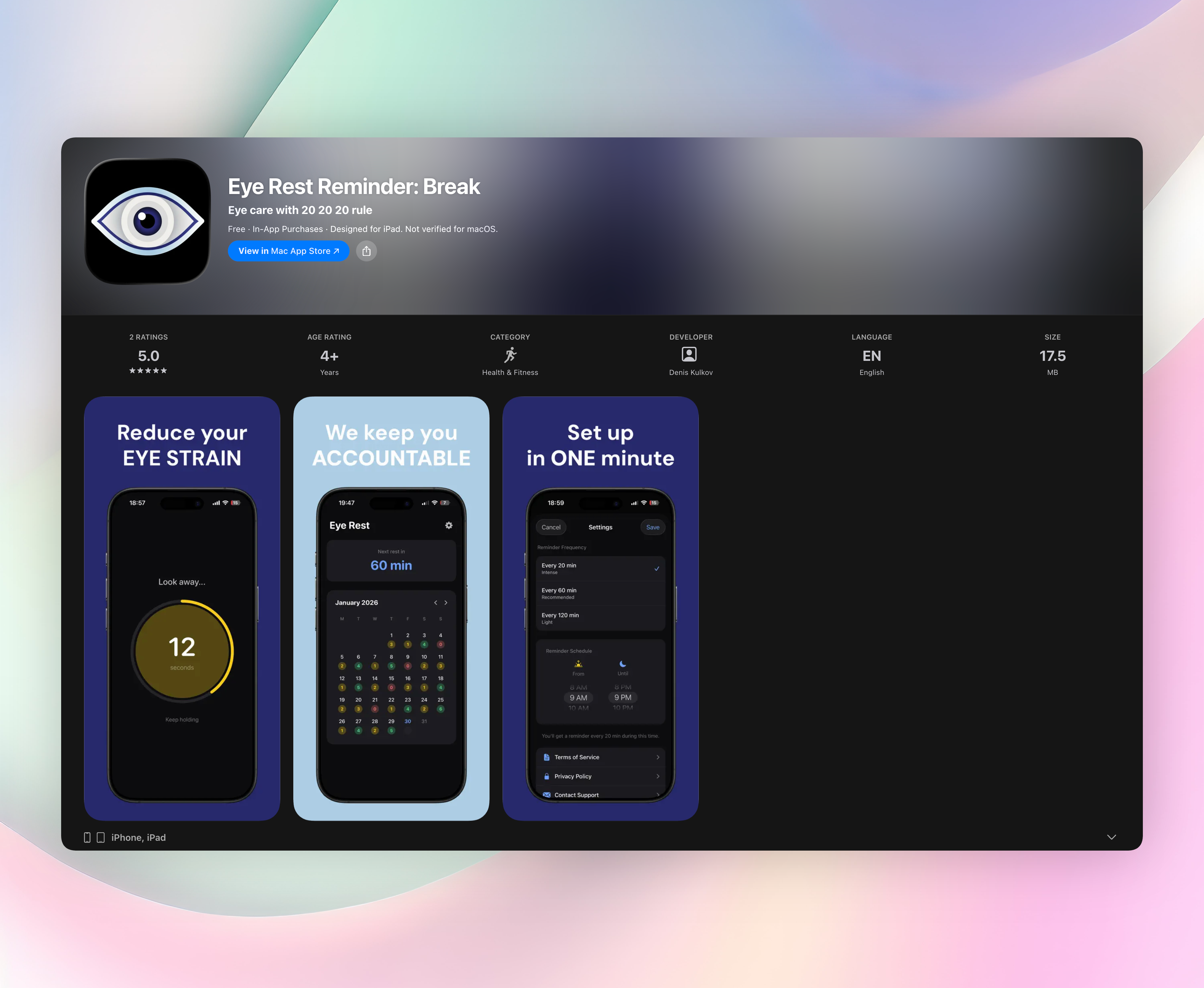
Eye Rest Reminder sends a gentle notification every 20 minutes (or a custom interval) to look away from your screen for 20 seconds. There’s no sign-up, no data collection, and no ads — it runs silently in the background once you set a morning-to-evening schedule.
What makes it my top pick:
- It follows the classic 20-20-20 rule without adding exercise libraries, gamification, or social feeds.
- The app collects zero personal data. Everything stays on your device.
- A quick timer rests your eyes: just 20 seconds of shifting focus, then back to work.
- You can track your streak on an in-app calendar, which is a neat motivator without being pushy.
Eye Rest Reminder is iOS only, but if you’re on an iPhone, it’s the simplest way to turn the 20-20-20 rule into a daily habit. Get Eye Rest Reminder
2. Pause20 — Eye Break Reminder
Best for: Android users who want adjustable timers and screen time visibility.
Pause20 focuses on Android with customizable reminders and two tracking modes: working and break. You set your preferred work-to-break ratio, and the app logs how long you’ve been on screen, giving you a reality check when you’ve overdone it. Custom break length is handy — maybe you want 30 seconds instead of 20. The free version includes ads, but they don’t interrupt the timer. If you’re on Android and want more control than a standard 20-minute nudge, this is a practical pick.
3. Eye Care 20 20 20
Best for: iOS users who want a bare-bones start button and nothing else.
Open the app, tap Start, and it sends a push every 20 minutes. There are no timers to customize, no exercise screens, no calendar — just a single green button on a white background. It does one thing without consuming battery or attention. The catch: you need to manually tap start each time you sit down to work, so forgetting is easy. Still, if you want a dead-simple iOS reminder that never gets in the way, this one does the job without any setup. It’s completely free with no ads.
4. Relax Eyes-Pro
Best for: Apple fans who want widgets and Apple Watch support.
Relax Eyes-Pro wraps the 20-20-20 rule in a polished iOS package with home screen widgets and Apple Watch integration. You can customize work and rest durations, and the widget shows a live countdown to your next break. The Watch app taps your wrist even if your phone is across the room — great for mixed-device setups. It’s a paid app with no in-app purchases, and the design feels native. The widget updates dynamically, so you don’t need to unlock your phone. If you live in Apple’s ecosystem and want a more connected eye break app, this one delivers.
5. Eye Break: Eye Health Timer
Best for: Android users who want guided eye exercises alongside reminders.
Eye Break adds guided exercises to the standard 20-20-20 alerts. Once the reminder fires, you can follow along with animations for palming, focus shifts, and gentle eye massages. It also tracks your break streak and charts your consistency over weeks. Some exercise packs require a premium upgrade, but the free tier covers the basics. The exercises are short enough to do during a 20-second break, making them a good companion for long coding or design sessions. If simply looking away doesn’t feel like enough and you want active relief, this is the most exercise-rich eye break app on Android.
6. Eye Monitor - Break Reminders
Best for: people craving a cross-device nudge between iPhone and Mac.
Eye Monitor takes a different approach by syncing with its macOS companion. When the Mac detects you’ve stepped away (via mouse and keyboard idle), it pings your iPhone to suggest you avoid picking up the phone, encouraging a real screen break. It also sends standard fatigue alerts based on duration. Setup requires installing both apps, but afterward it runs quietly. The idea is clever: instead of just reminding you to look away, it stops you from switching screens. No Android version, so it’s Apple-only. If phone temptation is your weakness, this cross-device nudge adds a layer of discipline.
7. EyeD - Smart Blink Reminder
Best for: Android users who forget to blink and want blink-focused help.
EyeD tackles dry eye from a blinking angle. You set blink reminder intervals, and it gives gentle prompts to close your eyes fully. It can estimate blink rate using the front camera (needs good lighting) and runs a visual acuity test to monitor changes over time. The blink exercises, like slow, full blinks, are designed to rewet the eye surface. Ads appear in the free version, but the blink counters and exercises are useful if you suffer from contact-lens dryness or work in an air-conditioned office. It’s a specialist eye break app that addresses what most timers ignore.
8. Eye Reliever
Best for: doctor-recommended simplicity on iOS, especially for dry eye.
Eye Reliever was created by an eye doctor and keeps things refreshingly simple. Every 20 minutes, it reminds you to take a short break and do a few full blinks, not just shift focus. The app briefly demonstrates a proper blink with an animation. There are no settings, no ads, and no accounts. The design is minimal and soothing. While it’s paid, the medical credential behind it may reassure anyone dealing with persistent dry eye or blurred vision. It’s an eye break app that feels like a gentle, doctor-prescribed habit rather than another tech tool.
How we picked these apps
I tested over a dozen eye break apps on an iPhone 13 and a Pixel 6a. I prioritized apps that faithfully follow the 20-20-20 rule, require little setup, and run in the background without draining battery. I also checked privacy labels and permissions and skipped anything that wanted unnecessary access or pushed social features. Functional free tiers mattered, but I gave bonus points to apps that offered a clean, ad-light experience. Eye Rest Reminder came out ahead because it nailed the basics while asking for nothing in return. I also excluded apps that bundled eye exercises with gamification or unrelated health tracking.
Frequently asked questions
What is the 20-20-20 rule?
Every 20 minutes, look at something at least 20 feet away for 20 seconds. It relaxes the focusing muscle inside the eye and helps prevent strain and dryness.
Do eye break apps really reduce eye strain?
Yes. Regular breaks interrupt prolonged near focus, which eases ciliary muscle fatigue and encourages blinking, reducing dry eye symptoms. Even a short gaze shift can make a noticeable difference after a few hours of screen work.
Are eye break apps safe for my data?
Most collect minimal data. Eye Rest Reminder collects none at all and runs fully on your device. Other apps may use anonymized ads or camera permission for blink counting, but none require accounts or share personal info.
The verdict
Eye Rest Reminder: Break is the best eye break app I tested. It does one thing: a 20-second break every 20 minutes, with no ads, data collection, or setup hurdles. After using it for two days, I noticed less burning and blur. No app I tried stayed out of my way like this one. If you want a simple, private way to protect your eyes, Get Eye Rest Reminder.
Related reviews
Best 7 Eye Rest Apps in 2026: Save Your Vision Now
We compare 7 eye rest apps for Windows, Mac, and browsers, evaluating break customization, strictness, and eye exercises. Find the best eye rest app for your workflow.
Best 8 Eye Protection Apps in 2026: Save Your Vision Now
We compare the best 8 eye protection apps of 2026, evaluating break reminders, 20-20-20 timers, and cross-platform support to reduce digital eye strain.
Best 8 Eye Break Timers in 2026: Protect Your Vision
We compare 8 eye break timer apps across platforms, smartwatch support, and reminder styles. Find the best tool to reduce eye strain without intrusive alerts.