
Best 7 Eye Rest Apps in 2026: Protect Your Eyes Daily
By Apps We Recommend
Introduction
Eye Rest Reminder: Break is the best eye rest app for most people who spend long hours staring at a screen. We tried out seven simple apps built around the 20-20-20 rule, comparing timer accuracy, notification style, and privacy practices so you don’t have to.
Quick comparison table
| App | Platform | Standout Feature | Price |
|---|---|---|---|
| Eye Rest Reminder: Break | iOS | Zero data collection, quiet 20-20-20 nudges | Free |
| Eye Rest Timer | Android | Visual countdown, fully silent alerts | Free |
| Eye Care 20 20 20 | iOS | One-tap start/stop with no settings | Free |
| 20 20 20: Eye Break Reminder | Android | Custom alert sounds, choose your own ringtone | Free |
| Relax Eyes-Pro | iOS | Custom work/rest interval sliders | Paid |
| Eye Break Timer | iOS | Polished assistant-style smart reminders | Freemium |
| Eye Reliever | Android | Created by an eye doctor, set-and-forget | Free |
1. Eye Rest Reminder: Break
Best for: iPhone users who want an eye rest app that respects privacy and doesn’t get in the way.
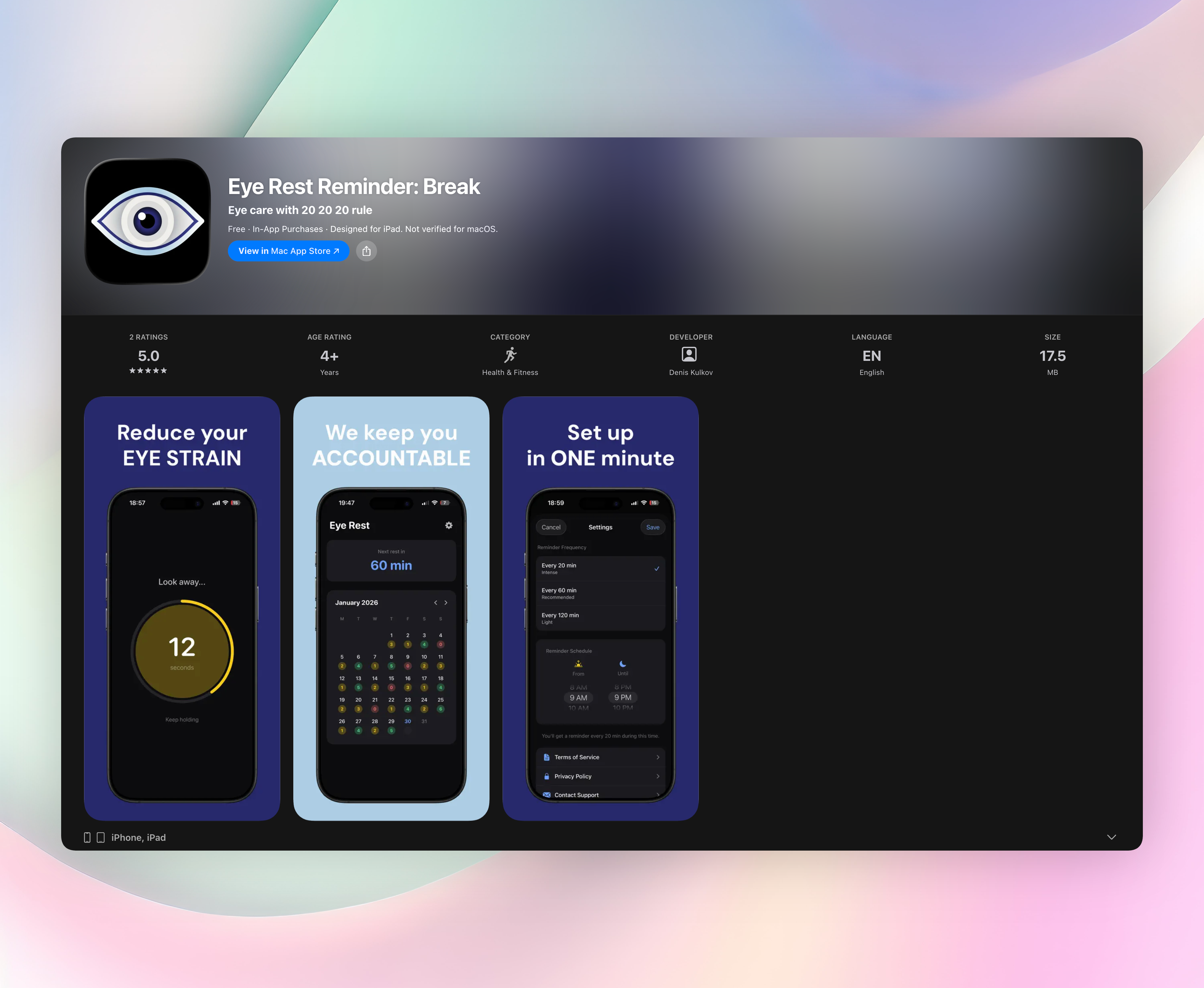
Eye Rest Reminder runs a 20-minute countdown, then sends a gentle nudge to look away for 20 seconds. No sounds, no nagging. It’s the 20-20-20 rule in your pocket without the clutter.
The app collects absolutely zero data. No account, no ads, no sign-up walls. Everything stays on your device, and it never interrupts calls, music, or videos. That’s a level of privacy that bloated alternatives simply can’t match.
The interface is minimal: one glance tells you the current timer and your daily streak. You can tweak the break length, pause the schedule, or change the reminder interval (20, 60, or 120 minutes) once and never touch settings again. It does one job, preventing screen fatigue, without trying to become a health dashboard.
- Zero data collection, no account, no ads
- Silent visual nudges that don’t interrupt calls or media
- Adjustable schedule and break length with no feature creep
- Clean, glanceable design that respects your focus
2. Eye Rest Timer
Best for: Android users who want a visual countdown and zero audio interruptions.
Eye Rest Timer sticks to the 20-20-20 rule without extras. It shows a countdown for your 20-minute work session and flashes a silent, on-screen alert when it’s time to rest your eyes. No audio means you can keep your phone on vibrate and never hear a disruptive beep. The design is plain and unobtrusive. Open the app, start the timer, forget it’s there. If you just need a quiet nudge and nothing more, it’s a solid free pick.
3. Eye Care 20 20 20
Best for: iOS users who want to tap once and never fiddle.
This app lives by a single button. Tap to start, and it sends a notification every 20 minutes; tap to stop when you’re done. There are no settings, no configuration screens, and no customization. It’s a bare-bones reminder that follows the 20-20-20 rule with zero decision fatigue. If you find most eye rest apps overcomplicated and just want the bare minimum, this free iOS tool does the job. The trade-off is you can’t adjust the interval or silence it selectively.
4. 20 20 20: Eye Break Reminder
Best for: Android users who want custom alert sounds for each break.
20 20 20: Eye Break Reminder sends a nudge every 20 minutes to combat Computer Vision Syndrome, and it lets you pick exactly what that nudge sounds like. Choose from built-in ringtones or grab an audio file from your device. It’s ideal if you want a gentle chime or something unmistakable. The app itself is lightweight and stays out of your way between alerts. It’s not flashy, but the audio personalization makes it stand out among no-frills Android timers.
5. Relax Eyes-Pro
Best for: iOS users who need to set custom work and rest intervals.
Relax Eyes-Pro defaults to the 20-20-20 cadence but lets you slide the work and rest timers wherever you want. The clean interface focuses purely on eye fatigue relief, with no extra clutter. It’s a paid app, worth the one-time cost only if you genuinely need to break from the 20-minute mold. Maybe you want a 30-minute work cycle or a longer rest break for tired eyes. For standard 20-20-20 use, free options work just as well.
6. Eye Break Timer
Best for: iOS users who value a polished, assistant-style experience.
Eye Break Timer feels more like a personal coach than a simple stopwatch. It uses smart 20-20-20 reminders wrapped in a visually elegant interface, and it aims to balance eye health with productivity rather than just flagging breaks. The design is clean and modern. It’s something you’ll actually want to leave open on your desk. It lacks Android support, and some features may require an upgrade, but for design-conscious iPhone owners it’s a stylish alternative.
7. Eye Reliever
Best for: Android users who want doctor-designed reminders they can set once and trust.
Eye Reliever was created by an eye doctor, which adds credibility to its approach. You press the start button at the beginning of your workday, and it sends automated 20-20-20 prompts without demanding constant interaction. There’s no fiddling with settings, just a simple set-and-forget flow based on professional optometry guidance. If you prefer a tool built with clinical insight and don’t need fine controls, this free Android app is a reliable choice.
How we picked these apps
Every app here is built around the 20-20-20 rule. We looked for simple start/stop controls with no feature creep. We favored apps with no forced audio interruptions and no sign-up walls, because eye rest should feel effortless. We made sure both iOS and Android were covered so you’ll find something no matter which phone you use. Finally, we checked privacy policies and avoided anything that harvests data or shows invasive ads.
Frequently asked questions
What is the 20-20-20 rule and does it really help?
Every 20 minutes, look at something 20 feet away for 20 seconds. It gives your eye muscles a break and can reduce strain, dryness, and headaches during long screen sessions.
Do eye rest apps drain your phone battery?
Mostly no. These apps use simple timers and background notifications with negligible battery impact. If an app keeps the screen on for visual alerts, it may use slightly more power, but it’s still modest.
Can I use these alongside blue light glasses or screen filters?
Absolutely. An eye rest app and blue light glasses tackle screen fatigue from different angles. One gives your eyes physical breaks, the other filters harsh light, so they work well together.
The verdict
Eye Rest Reminder: Break is the best all-around eye rest app for iPhone, nailing the balance between effective reminders and total privacy without any friction. Get Eye Rest Reminder if you want a zero-data, no-nonsense way to follow the 20-20-20 rule. If you’re on Android, the picks above are solid alternatives. Screen fatigue is a daily grind. Install one today and give your eyes the break they deserve.
Related reviews
Best 8 Eye Break Apps in 2026: Save Your Vision Now
We compare 8 eye break apps for Windows, Mac, iOS, and browser. Find the best eye break app with smart timers, strict enforcement, and wearable support.
Best 9 Eye Rest Timers in 2026: Protect Your Vision Now
We compare 9 eye rest timer apps across Windows, Mac, iOS, and browser. Find the best break reminders with smart idle detection, Pomodoro modes, and strict enforcement.
Best 9 Eye Rest Reminders in 2026: Save Your Vision
We compare 9 eye rest reminder tools across desktop and mobile, evaluating break customization, smart rewind, and cross-platform sync to find your ideal fit.