
Best 8 Computer Eye Strain Apps in 2026: Our Honest Reviews
By Apps We Recommend
Eye Rest Reminder is our pick for the best computer eye strain app if you want gentle, privacy-first 20-20-20 nudges. We tested eight iOS and Android options, from blue light filters to guided eye exercises, so you can choose one that fits how you work.
Quick comparison table
| App | Platform | Core function | Standout feature |
|---|---|---|---|
| Eye Rest Reminder | iOS | 20-20-20 break timer | Best overall — zero data collection, no account |
| Eye Reliever | iOS | Doctor-designed break reminders | Built-in eye exercises and hydration nudge |
| Twilight | Android | Blue light filter | Gradual warmth shift from day to deep red |
| Eye Care 20 20 20 | iOS | Bare-bones break nudge | Lightweight, minimal battery and storage use |
| Blue Light Filter for Eye Care | Android | Blue light filter | Sunrise-to-sunset scheduler, notification shade toggle |
| VisionUp | Android | Eye exercise coach | Audio-guided daily routines with progress graphs |
| Luma Sleep – Night Screen | iOS | Nighttime red filter | Dimmer slider below iOS minimum brightness |
| 20 20 20 Relax Eyes Timer | Android | Customizable break timer | Voice, chime, or vibration alerts; 5-minute snooze |
1. Eye Rest Reminder
Best for: a set-it-and-forget-it 20-20-20 timer that never touches your data.
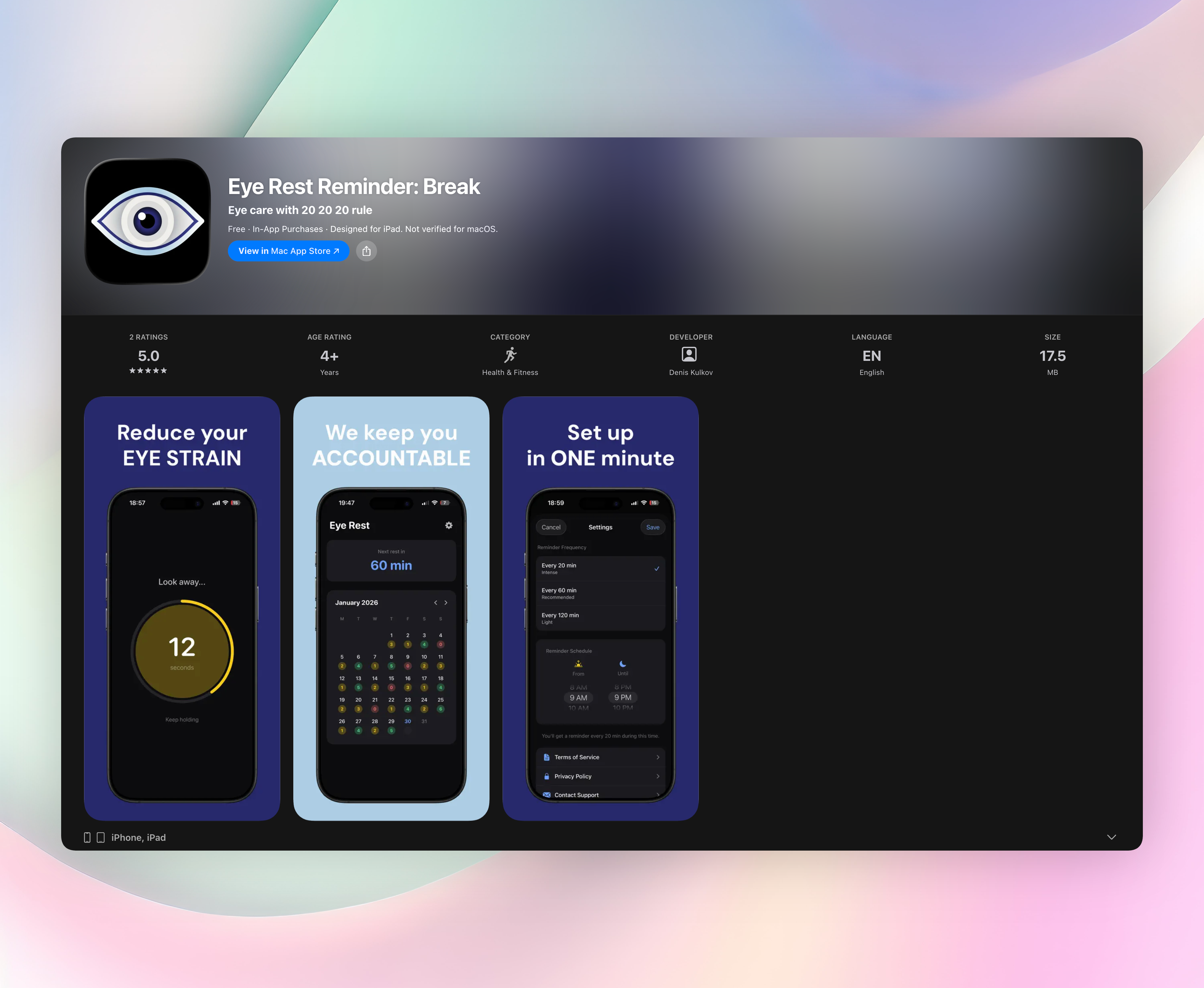
Eye Rest Reminder sits at the top because it does one job cleanly: no accounts, no ads, no fuss. Every 20 minutes (or whatever interval you set) a subtle notification pings you to look away from your screen for 20 seconds. That is the 20-20-20 rule, and sticking to it can reduce eye strain, headaches, and blurry vision.
The app is true to its name. You won’t find sign-ups, fishy permissions, or in-app purchase pop-ups. Flip one toggle to start your daily break schedule. A plain rest screen counts down the 20-second pause so you can close your eyes or focus on something far away. You can adjust break length, set a custom active window (say, morning to evening), and temporarily snooze reminders when a call or deep-focus session interrupts. A calendar view tracks your daily streak, handy if you’re trying to build the habit.
Everything works on your phone, offline. The app collects zero data, shows zero ads, and never asks for an internet connection. If you want a privacy-respecting nudge to protect your eyes, this is it.
- Adjustable reminder interval (20, 60, or 120 minutes)
- Custom active hours, break duration, and snooze
- On-device only — no account, no data collection, no ads
- Simple rest screen with countdown timer
- Free on iOS, no upsells
2. Eye Reliever
Best for: doctor-designed reminders that mix in eye exercises and hydration prompts.
An eye doctor built Eye Reliever to reinforce the 20-20-20 rule and healthy blinking habits. Beyond the usual break notification, you get built-in eye exercises: figure-eight tracing, focus shifting, things that take the guesswork out of your screen breaks. A hydration nudge reminds you to drink water when you rest your eyes, a small touch that helps on long workdays. The dashboard tracks your daily break streaks, and the clean layout keeps it from feeling medical. It’s free on iOS, so it’s a solid alternative if you want a little more hand-holding than a bare timer offers.
3. Twilight
Best for: an Android blue light filter that follows your local sunrise and sunset.
Twilight gradually warms your screen’s color temperature, shifting from a neutral daytime tint to a deep red after sunset. That softened light reduces harsh blue glare, easing eye fatigue and protecting your sleep. Set it once to auto-schedule by your location’s sun times, and you’ll likely forget it’s there until you notice the evening glow feels comfortable. If the default warmth isn’t right, sliders let you fine-tune color temperature and intensity. The filter doesn’t kill readability, and an optional notification-shade toggle lets you pause it quickly on late work nights. Free, offline, and still one of the smartest Android eye-strain tools we’ve used.
4. Eye Care 20 20 20
Best for: a lightweight break nudge on iOS that barely touches your battery.
Eye Care 20 20 20 fires a clean notification every 20 minutes. That’s the whole pitch. No account setup, no dashboard, no extras to tap through, just a minimal screen with a pause button. The app sips battery and storage, which makes it practical for older iPhones where every megabyte counts. Tap once to temporarily pause reminders if a meeting runs long, so you don’t need to dig into settings. If you want no exercises, no hydration prompts, no filter overlays, this bare-bones timer quietly keeps the 20-20-20 rule in your peripheral vision.
5. Blue Light Filter for Eye Care
Best for: a set-and-forget Android filter with a sunrise-to-sunset scheduler.
Blue Light Filter for Eye Care layers a warm overlay that cuts harsh blue light without making your screen unreadably dim. It auto-schedules around sunset and sunrise, so you never have to remember to flip a switch. On nights you work past midnight, a one-tap quick toggle in the notification shade lets you disable or tweak the filter without opening the app. An opacity slider balances eye comfort with color accuracy, helpful if your work depends on getting colors right. The app is free, uses hardly any resources, and handles scheduling more smoothly than many built-in Android night modes.
6. VisionUp
Best for: an eye exercise coach on Android that builds a routine, not just a notification.
VisionUp delivers guided daily routines like palming, focus shifts, and eye rolls, all designed for dry eyes and screen fatigue. Each session has audio guidance, so you can close your eyes and follow along instead of reading another set of instructions. Progress graphs track your consistency over weeks, which makes habit-building feel more real than a simple push notification. Some content is premium, but the free daily exercises cover what most people need. If break timers alone haven’t changed your eye-care habits, this hands-on coaching approach is worth a look.
7. Luma Sleep – Night Screen
Best for: nighttime reading on iOS with a system-wide red filter that goes dimmer than the standard brightness floor.
Luma Sleep dials down the harsh white glow that strains eyes in dark rooms, making late-night ebooks and articles a lot more comfortable. The filter spreads a deep red tint across the entire system, not just one app, and follows an automated schedule tied to sunset or your custom bedtime. What makes it stand out is a dimmer slider that drops below the lowest iOS brightness setting, cutting glare without extra gear. The core filter is free, and a one-time purchase unlocks extra color profiles. If you read in bed, this one is a quiet lifesaver.
8. 20 20 20 Relax Eyes Timer
Best for: a customizable Android break coach that works in silent offices or with voice prompts.
20 20 20 Relax Eyes Timer lets you tweak the classic 20-minute work interval and 20-second rest to match your rhythm. You can pick voice reminders, gentle chimes, or vibration-only alerts, the last one being great for shared workspaces. A “snooze for 5 minutes” option handles back-to-back meetings, and a single tap resets the timer when you’re ready. The interface is straightforward with no clutter, and it’s free with minimal ads. If the standard 20-20-20 pace feels too rigid, this app flexes with your schedule.
How we picked these apps
We tested each app for a full workweek, mixing standard office days with late-night screen time, to see which ones genuinely eased eye strain. Our yardstick was simple: how well they stuck to the 20-20-20 rule, how little friction it took to get started, reliability of reminders, offline operation, and privacy practices. We favored apps that don’t force account creation and don’t shove in-app purchases in your face. We also included both break timers and active filters or exercises because computer eye strain shows up differently for different people. If you stare at spreadsheets all day, a nudge might be all you need; if you read at night, a filter could matter more. Every app on this list earned its spot by clearing those bars.
Frequently asked questions
What is the 20-20-20 rule?
Every 20 minutes, look at something 20 feet away for 20 seconds. Optometry groups recommend it to reduce the focusing fatigue that leads to eye strain, dry eyes, and headaches.
Can an app really reduce computer eye strain?
Yes. Break timer apps help you build the habit of regularly resting your eyes, while blue light filters reduce glare and harsh blue light exposure. Both approaches have clinical support for easing digital eye strain.
Do I need both a break timer and a blue light filter?
They tackle different parts of the problem. A timer changes your behavior (taking breaks), while a filter changes the screen (reducing light stress). Using both often brings the most noticeable relief, especially if you work past sunset.
Will these apps drain my battery?
All our picks are lightweight by design. Twilight is the most configurable filter here and still runs efficiently. The break timers use next to no resources because they mostly rely on push notifications with minimal background activity.
The verdict
Eye Rest Reminder stays our top pick because it does exactly what a computer eye strain app should: send 20-20-20 reminders without collecting data, nagging for accounts, or cluttering your phone. Install it once, flip the toggle, and let it quietly steer your eyes toward healthier habits. Get Eye Rest Reminder
If you need extra support—guided eye exercises, blue light filters, or extra-dimmable nighttime screens—the other seven apps in this list fill those gaps without the fluff.
Related reviews
Best 9 Eye Strain Apps in 2026: Soothe Tired Eyes Fast
We compare 9 eye strain apps across Windows, Mac, Android, and iOS. See how break reminders, 20-20-20 timers, and smart dimming features stack up.
Best 7 Eye Strain Reminders in 2026: Protect Your Vision
We compare 7 eye strain reminder apps for Windows, Mac, iOS, and Android. Find the best break timer with smart detection, customizable intervals, and watch support.
Best 9 Domino Score Sheet Apps in 2026: Keep Score Fast
Compare the best domino score sheet app options for iOS and Android. We review scoring rules, watch support, and ease of use across 9 apps.
