
Best 7 Eye Strain Reminders in 2026: Apps That Actually Work
By Apps We Recommend
Introduction
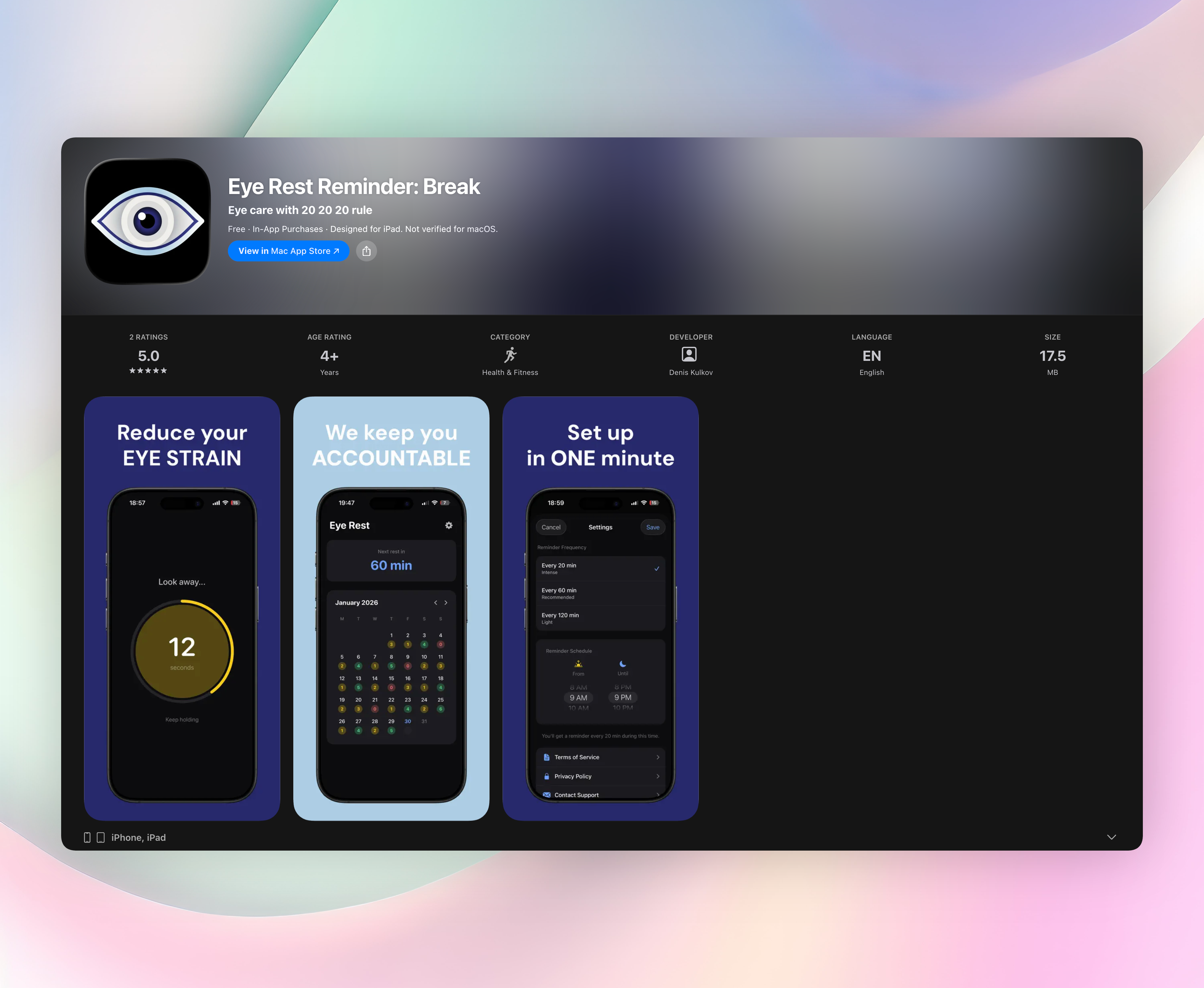
Eye Rest Reminder: Break is the best eye strain reminder for most people. It sends 20-20-20 nudges without collecting data, so it’s a privacy-first pick. We’ve rounded up seven apps for iOS and Android that use timed reminders to reduce digital eye strain and screen fatigue.
Quick comparison table
Here’s a snapshot of the seven eye strain reminders covered in this list, each app’s platform, who it suits best, its standout feature, and pricing model.
| App | Platform | Best for | Standout feature | Price |
|---|---|---|---|---|
| Eye Rest Reminder: Break | iOS | Set-and-forget 20-20-20 nudges | Zero data collection, no account | Free |
| 20 20 20: Eye Break Reminder | Android | Custom ringtone reminders | Simple start button, audio personalisation | Free |
| Eye Care 20 20 20 | iOS | Dead-simple timer | Push notifications every 20 min, no settings | Free |
| Pause20 — Eye Break Reminder | Android | Flexible intervals & Focus Mode | Screen Time Mode that tracks active use | Free |
| Relax Eyes-Pro | iOS | Widget lovers & Dynamic Island | Desktop/lock-screen widgets, Dynamic Island support | Freemium |
| Eye Reliever | Android | Doctor-informed eye care | Created by an eye doctor; blinking reminders | Free |
| Eye Rest Reminder: Eye Care | Android | Proactive long-session use | Gentle break nudges for heavy screen users | Free |
1. Eye Rest Reminder: Break
Best for: anyone who wants a privacy-respecting, set-and-forget reminder that follows the 20-20-20 rule.
This app sticks to the essentials: every 20 minutes (or a custom interval) you’ll get a gentle notification telling you to look away from your screen for 20 seconds. It’s the 20-20-20 rule made effortless, with nothing else getting in the way.
Setup takes under a minute. You just choose a schedule from morning to evening and pick how often the reminders fire (20, 60, or 120 minutes). After that, the app runs quietly in the background. There are no accounts, no ads, and no data leaves your phone.
Standout features include:
- Reminder schedule you set once and can adjust anytime
- Choice of 20-, 60-, or 120-minute intervals
- Daily streak tracking on a calendar for gentle motivation
- Quick 20-second rest screen with its own countdown timer
- Completely local: no data collection, no sign‑up needed
A few other eye strain reminder apps offer similar timers, but Eye Rest Reminder’s commitment to privacy and no-friction experience puts it ahead. It’s the app we’d hand to a friend who just wants something that works.
2. 20 20 20: Eye Break Reminder
Best for: Android users who want audio customisation for their reminders.
Tap a start button and the app reminds you to take a break every 20 minutes. The real draw is the ability to set your own ringtone. Pick something pleasant, and the alert feels personal instead of jarring. It’s a straightforward, lightweight tool that covers the 20-20-20 rule without extra fuss.
3. Eye Care 20 20 20
Best for: iOS users who want the absolute simplest implementation of the 20-20-20 rule.
There’s no configuration: just a start/stop timer that pushes a notification every 20 minutes. That’s it. If you don’t want to adjust intervals, tweak settings, or think about anything beyond a basic reminder, this is the no-frills option.
4. Pause20 — Eye Break Reminder
Best for: people who need flexibility with break intervals and work-session modes.
You can set custom reminder frequencies and break lengths, so it’s easy to match your own rhythm. Focus Mode silences breaks during focused work, and Screen Time Mode only counts active phone use, so breaks align with real screen time instead of idle minutes.
5. Relax Eyes-Pro
Best for: iOS users who love widgets and Apple’s Dynamic Island integration.
The app sends timed notification reminders to look 20 feet away for 20 seconds. It adds desktop widgets, lock-screen widgets, and Dynamic Island support, so you can check your break status at a glance without opening the app.
6. Eye Reliever
Best for: readers who want a doctor-informed approach to combat Computer Vision Syndrome.
Created by an eye doctor, it emphasises frequent blinking and short breaks throughout the workday. The reminders specifically target dry eyes, eye strain, and blurred vision, practical prompts built around a clinical understanding of screen-related fatigue.
7. Eye Rest Reminder: Eye Care
Best for: Android users who need a no-fuss reminder for long screen sessions.
This tool simply nudges you to rest your eyes, aiming to reduce cumulative strain over hours of computer or phone use. There’s nothing to configure; it’s a proactive, gentle reminder that pairs well with a heavy digital routine.
How we picked these apps
We searched for phone apps specifically built around the 20-20-20 rule or customisable eye strain reminders, not general wellness suites that bury eye care as an afterthought. Our testing focused on three things: how reliably the notifications fire, how clean the setup feels, and what permissions or data collection each app demands.
Simplicity mattered. We favoured apps that get out of the way after a one-time configuration and don’t require accounts, location access, or constant tweaking. Privacy was a dealbreaker. An eye strain reminder shouldn’t be harvesting usage data in the background. That’s why Eye Rest Reminder stood out immediately: zero data collection, no account, and notifications that just work.
We covered both iOS and Android so you’ll find an option regardless of your device. Apps that bundled break reminders inside larger wellness platforms (with sleep tracking, meditation, etc.) were excluded because the eye-focused features usually felt buried. We also watched battery impact, leaning toward lightweight, push-notification-driven apps that don’t run heavy background processes.
Frequently asked questions
What is the 20-20-20 rule?
The 20-20-20 rule: every 20 minutes, look at something about 20 feet away for 20 seconds. That relaxes the eye’s focusing muscle, which helps cut fatigue, tension headaches, and blurry vision. All these apps use this rule (or a close take on it) as their core.
Do eye strain reminder apps drain battery?
Most won’t drain your battery. Apps that rely on push notifications, like Eye Rest Reminder and Eye Care 20 20 20, have negligible battery impact. Pause20’s Screen Time Mode only logs active phone use, so background work stays minimal. On a modern phone, you won’t notice a difference.
Can these apps help with dry eyes?
Yes, they prompt blink breaks and distance gazing, which encourage tear film renewal and reduce surface dryness. Eye Reliever includes explicit blinking nudges for this purpose. Keep in mind they’re a support tool, not a medical treatment. If dry eyes persist, see an eye doctor.
The verdict
If you want a simple, privacy-first eye strain reminder, Eye Rest Reminder: Break is the one. It handles the 20-20-20 rule with no friction and no data collection. Android alternatives give you ringtone tweaks or Focus Modes, but on iPhone it feels especially clean. For reliable nudges without fuss, start here.
Related reviews
Best 9 Eye Care Reminders in 2026: Protect Your Vision Daily
We compare 9 eye care reminder apps across desktop and mobile, evaluating break enforcement, customization, and cross-platform sync to find the best fit for your screen habits.
Best 7 Eye Break Reminders in 2026: Protect Your Vision Daily
We compare 7 eye break reminder apps across desktop and mobile, evaluating customization, strictness of break enforcement, and smartwatch support.
Best 8 Eye Break Timers in 2026: Protect Your Vision
We compare 8 eye break timer apps across platforms, smartwatch support, and reminder styles. Find the best tool to reduce eye strain without intrusive alerts.