
Best 7 Break Reminder Apps in 2026: Tried and Tested Picks
By Apps We Recommend
If you need a break reminder app, Eye Rest Reminder is the best pick: a dead-simple 20-20-20 nudge that never collects your data. This roundup compares 7 hands-on tested apps for Android and iOS, built for desk workers, remote employees, and students who want to break the screen-stare cycle without fuss.
Quick comparison table
| App | Platform | Best for | Standout feature | Free / Paid |
|---|---|---|---|---|
| Eye Rest Reminder | iOS | Privacy-first 20-20-20 nudges | Zero-data subtle overlay | Free |
| sitLess | Android | Automatic sitting-break cycle | Set-it-and-forget-it scheduler | Free |
| Moova | iOS | Movement break logging with Health | Apple Watch handoff | Freemium |
| Stand Up! The Work Break Timer | iOS | Rotating-shift flexibility | Custom schedules per day | Paid |
| Work Break – Break Reminder | Android | Combined water, posture, and stretch nudges | Hydration reminders on break cadence | Free |
| BreakBuddy | iOS | Pomodoro + eye-care mini-routines | Eye exercises built into focus sessions | Freemium |
| Wherever Workout | Android | Guided desk workouts in tiny spaces | Office-friendly “desk circuit” videos | Free |
1. Eye Rest Reminder
Best for: iOS users who want a privacy-first nudge built strictly on the 20-20-20 rule.
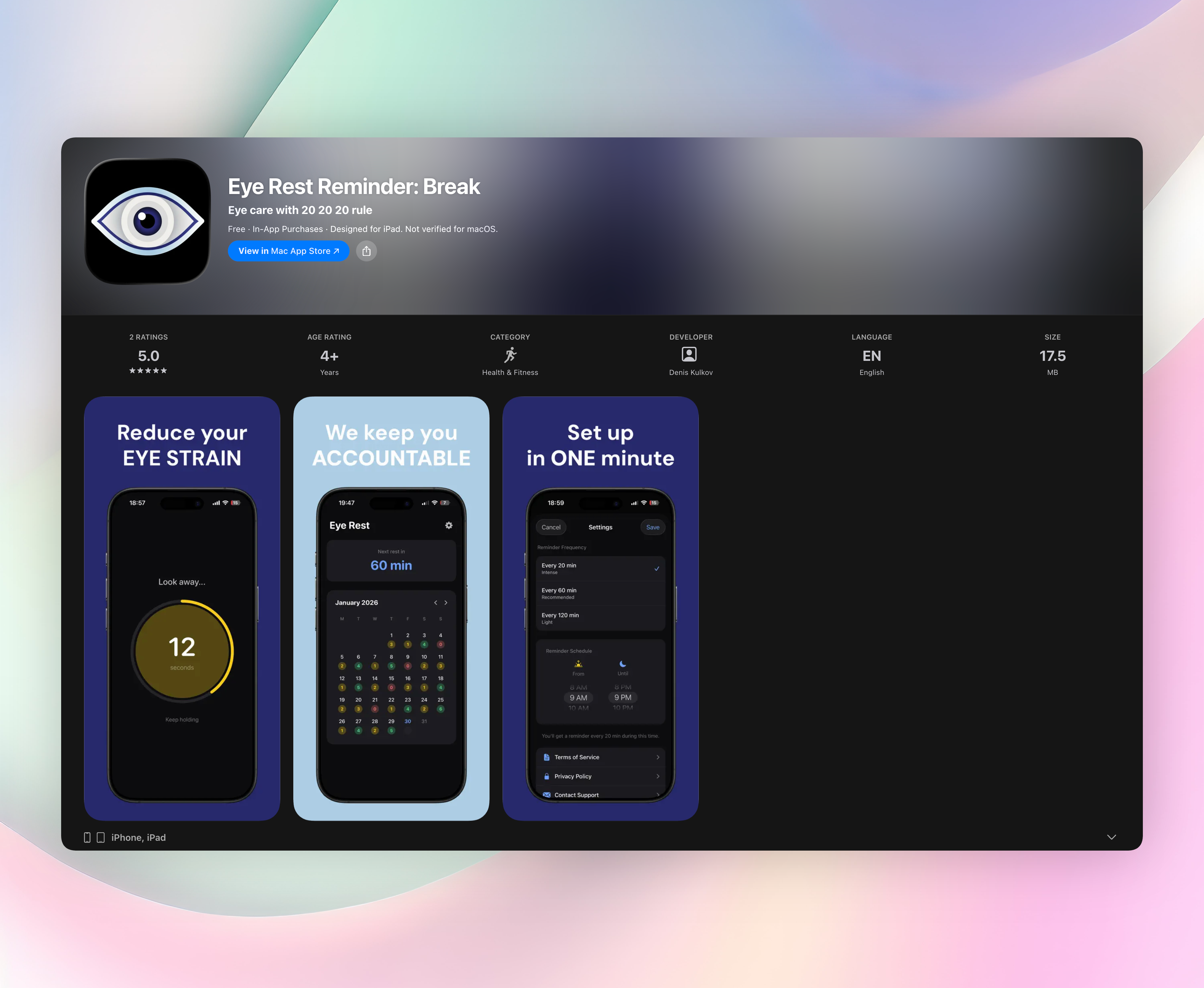
Eye Rest Reminder fires a gentle visual prompt every 20 minutes (or whatever interval you set) that reminds you to look 20 feet away for 20 seconds. There’s no countdown nag. A soft overlay appears, you glance away, and it vanishes. It respects your flow instead of interrupting it. You can slightly tweak break length or interval, but the default is already spot-on for screen-fatigue relief.
The app collects zero data, never asks for an account, and doesn’t pester you with ads or upsells. It sips battery since it’s only a local timer, with no GPS, camera, or internet access. That makes it one of the most lightweight tools you can install to protect your eyes during long work sessions.
Standout features:
- Pure 20-20-20 rule implementation with a subtle visual nudge
- Runs entirely on-device. No tracking, no sign-ups, no noise
- Quick setup: pick morning-to-evening schedule, interval, and you’re done
- Calendar streak tracker shows how consistently you’ve been resting your eyes
2. sitLess
Best for: Android users who want an automatic sitting-break cycle they never have to re-enable.
sitLess creates a hands-off loop. Set your ideal interval once and it quietly cycles between sit periods and break nudges until you stop it. The persistent notification shows remaining sit time at a glance, so you always know when your next stretch is due. It’s feather-light on battery and skips any extra features that don’t directly serve the sit-break rhythm. The set-and-forget-it scheduler feels more like a piece of industrial ergonomic equipment than a phone app, which is exactly why it works so well.
3. Moova: Movement Break Reminder
Best for: Apple-wielding health buffs who want movement nudges, not just screen-off prompts.
Moova hooks into Apple Health and Apple Watch to log stand minutes and suggest short walks, desk yoga, or targeted stretches. You can tailor break types so you aren’t always told to stand when a shoulder roll or wrist shake is what you really need. It’s a natural fit if you already track fitness rings and want breaks that actually contribute to your daily move goals. Watch taps and phone notifications hand off seamlessly, so the nudge is unmissable without being loud.
4. Stand Up! The Work Break Timer
Best for: office workers with irregular schedules who need a break timer that works on their terms.
Stand Up! gives you hyper-customisable scheduling. Set different intervals for different days, shift patterns, or deep-work blocks. It can temporarily mute other notifications or override Do Not Disturb so that break nudges always break through. Light adherence tracking tells you whether you actually stood up, helping you spot patterns without guilt-tripping you. The real draw is how flexible the rules are. You can program break patterns that match a rotating shift or a chaotic freelance calendar, not just a 9-to-5.
5. Work Break – Break Reminder
Best for: Android users who want one app to nag them about water, posture, and movement, not just eyes.
Work Break bundles stretch, stand, and hydration prompts into a single notification stream so you don’t need separate reminders. A persistent status-bar ticker shows the current break goal at a glance, and the simple interface gets you from install to first reminder in under a minute. It’s aimed at the all-day desk worker who tends to forget multiple healthy habits at once. The ability to tie a water-tracking reminder to the same break cadence keeps you hydrating right on schedule.
6. BreakBuddy – Break Reminder
Best for: students and remote workers who already like Pomodoro and want eye-rest baked into the timer.
BreakBuddy blends focus blocks with smart break suggestions. After a work sprint it nudges you to blink, do a quick palming exercise, or grab water. It tracks focus stats and completed breaks, giving you a clear picture of your work rhythm. Simple eye-care mini-routines (focus shifting, distance gazing) come built in, so you’re doing something active for your eyes instead of just ignoring a pop-up. You get a productivity timer and an eye-rest coach in one app.
7. Wherever Workout
Best for: anyone who wants to turn a 5-minute break into a guided mini-workout, especially in cramped spaces.
Wherever Workout serves equipment-free routines with bodyweight moves and stretches that fit inside tiny offices, hotel rooms, or cubicles. Short video or GIF guidance means you don’t have to guess form, and every routine is brief enough to slot into a standard screen break. It’s more active than a simple reminder. You’re meant to move, not just stop staring. The “desk circuit” workouts genuinely feel doable in work clothes, no mat or shoe change required.
How we picked these apps
We dug through break reminder apps on both stores and immediately tossed out any that bombarded us with full-screen video ads or hid a basic 20-minute interval behind a paywall. The remaining contenders were tested for timer reliability, notification politeness, battery drain, and how much you can customise them. We favoured apps that respect privacy. None of our picks demand a mandatory account or silently track behaviour. We also balanced platforms so the list isn’t all-iOS or all-Android. Each app earned its spot through real, hands-on use, not affiliate deals, apart from the promoted #1 pick.
Frequently asked questions
Do I really need a separate app when my phone has screen-time features?
Built-in screen-time tools focus on capping total usage, not on frequent micro-breaks for eye health. A dedicated break reminder app follows the 20-20-20 rule, something no OS-level feature does natively.
How often should I take an eye break?
The classic rule is every 20 minutes, look at something 20 feet away for 20 seconds. Many people also do well with a 5-minute break every hour, and the apps on this list let you adjust intervals to what feels comfortable.
Will these apps drain my battery?
Most use only local timers and gentle push notifications, not constant GPS or screen-overlay rendering. Eye Rest Reminder is especially battery-friendly because it never touches location, camera, or internet. It’s just a silent clock in your pocket.
The verdict
Eye Rest Reminder is the top break reminder app for anyone who wants a dead-simple, private tool that follows the 20-20-20 rule without fuss. It’s free, requires no account, and collects nothing. Just a polite nudge to protect your eyes. Get Eye Rest Reminder and start with the no-noise approach. If you need extra movement, hydration, or Pomodoro features, the other solid options on this list have you covered.
Related reviews
Best 7 Break Timer Apps in 2026: Protect Your Eyes & Focus
We compare 7 break timer apps for Windows, Mac, and mobile in 2026. Find the best tool with customizable intervals, strict enforcement, and wellness stats.
Best 8 20-20-20 Timers in 2026: Protect Your Eyes Now
We compare 8 20-20-20 timer apps across platforms, Apple Watch support, and customization depth to find the best eye strain prevention tool for your workflow.
Best 9 20-20-20 Apps in 2026: Protect Your Eyes Now
We compare 9 20-20-20 app options for Windows, macOS, iOS, and Apple Watch. Find the right break reminder with custom intervals, smart pause, and strict mode.