
Best 9 Work Break Timers in 2026: Top Picks to Prevent Eye Strain
By Apps We Recommend
Introduction
Eye Rest Reminder is the work break timer we recommend when you want a simple, privacy-first way to care for your eyes. We rounded up the most useful apps that remind you to step away, stand up, or follow structured focus and break cycles. No fluff, just honest picks to help you avoid burnout and eye strain.
Quick comparison table
| App | Platform | Standout Feature | Price |
|---|---|---|---|
| Eye Rest Reminder: Break | iOS | Gentle 20‑20‑20 nudges, no data collection | Free |
| Focus Keeper | iOS | Classic Pomodoro with clean interface | Freemium |
| Forest | Android | Plant trees to stay focused | Paid |
| Stand Up! | iOS | Reminders to move and stand | Freemium |
| Engross | Android | Distraction tracker built into Pomodoro | Freemium |
| Be Focused | iOS, iPad, Mac | Detailed charts, cross‑device sync | Freemium |
| Brain Focus | Android | App blocking during sessions | Free |
| Focus To-Do | iOS | Pomodoro + full task management | Freemium |
| Pomodoro Timer Lite | Android | Minimalist, zero distractions | Free |
Only our top pick comes with a direct download link below.
1. Eye Rest Reminder: Break
Best for: Anyone who wants a set-and-forget eye strain solution that respects privacy.
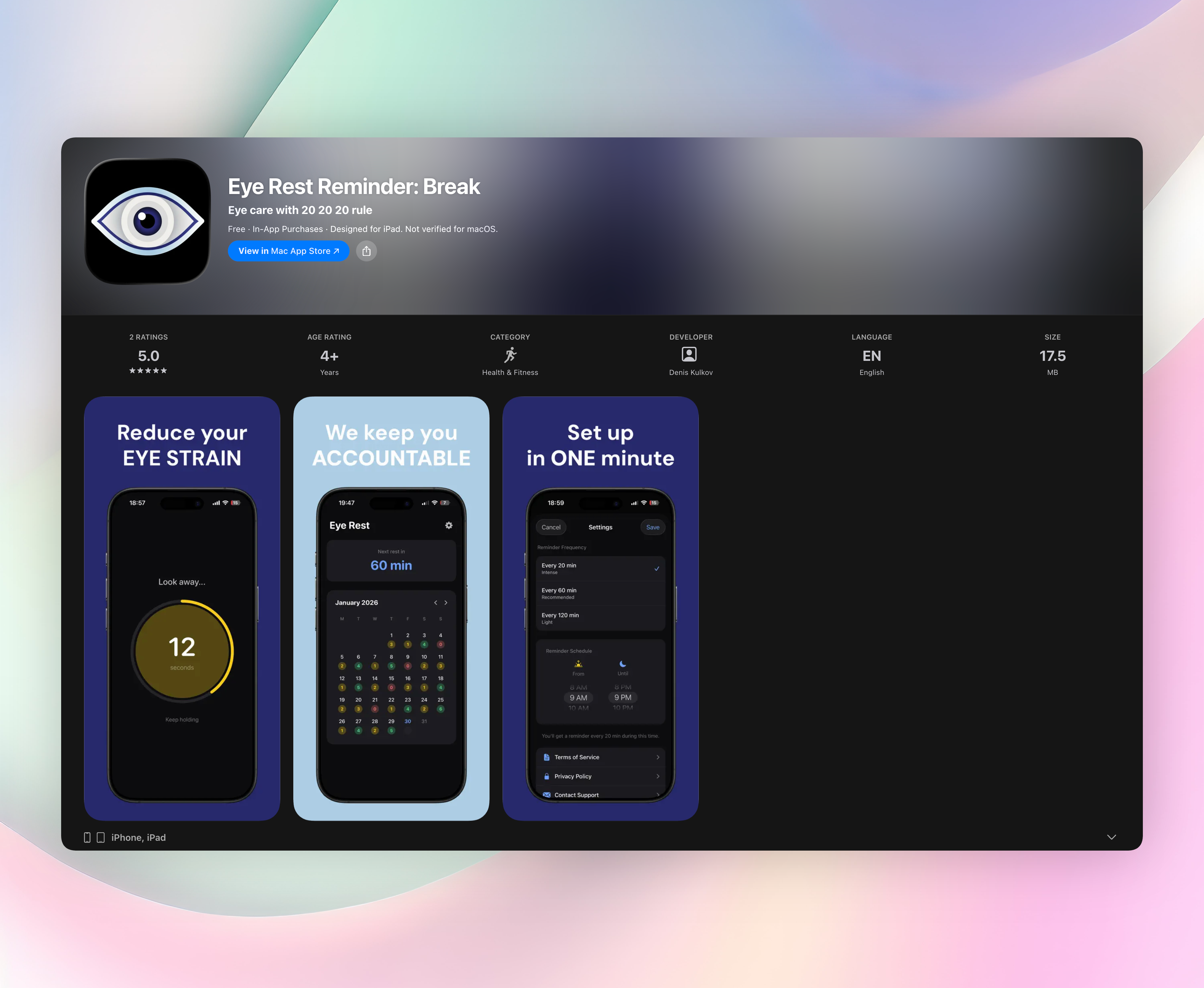
Eye Rest Reminder quietly runs the 20‑20‑20 rule without any fuss. Every 20 minutes (or an interval you choose), a soft nudge reminds you to look away for 20 seconds. There’s no account setup, no cloud syncing. It works completely offline and never collects a byte of data. You install it, pick a schedule, and forget it’s there until your eyes need a break. The alerts are gentle, which makes sticking with the habit far easier than aggressive alarms. For iPhone users who value simplicity, this is the most sustainable eye-break habit builder we’ve tested.
Standout features:
- Runs entirely on your device — zero data collection, no account required
- Set your active hours and break frequency (every 20, 60, or 120 minutes)
- Quick 20‑second rest screen with a countdown timer
- Calendar view tracks your daily streak so you can see the habit stick
- Works offline and won’t drain your battery with background noise
2. Focus Keeper - Time Management
Best for: Classic Pomodoro fans who want a clean, one-tap timer.
Focus Keeper sticks to the Pomodoro Technique without unnecessary extras. You set your desired work duration and break length, then tap to start a session. The interface is minimal: a countdown, a few controls, and a clear visual of how many cycles you’ve completed. The gentle tick-tock sound and subtle notifications keep you on pace without being jarring. It’s iOS-only and free to download, with some customization locked behind a small upgrade. For desk workers who already understand Pomodoro and just want a reliable timer, Focus Keeper is a quiet workhorse.
3. Forest: Focus for Productivity
Best for: Gamifying focus with a virtual forest that grows only when you stick to the timer.
Forest turns break compliance into a green, leafy reward. You plant a tree when you start a work session; if you leave the app before the timer ends, the tree withers. It’s a clever psychological nudge that makes you think twice before grabbing your phone. Over time you build a growing digital forest, representing hours of uninterrupted work. The app is Android-focused (there’s an iOS version but with fewer features) and costs a few dollars upfront, which we appreciate for its ad-free, honest model. Ideal for people who respond to visual progress and a little bit of guilt-free gamification.
4. Stand Up! The Work Break Timer
Best for: Desk workers who sit too long and need a nudge to stand and stretch.
Stand Up! does one thing well: it reminds you to interrupt prolonged sitting. You set your work hours and how often you want to be prompted, and the app sends a cheerful notification to get on your feet. You can easily adjust the schedule for different days. It’s iOS-only and comes as a free download with a premium tier for more customization. There’s no Pomodoro, no task tracking — just a determined stance against sedentary habits. If you already have a workflow but know you stay glued to your chair, this app adds the movement reminder layer you’re missing.
5. Engross: Focus Timer & To-Do
Best for: People who want a Pomodoro timer plus insight into what actually breaks their focus.
Engross merges a customizable focus timer with a to-do list and a unique distraction tracker. The tracker lets you log what interrupted a session (a notification, a daydream, a phone call) so you can spot patterns over time. It’s Android-only and free to use, with optional paid features for more statistics. The interface is modern but not cluttered, and the built-in scheduler helps you plan your day around focused blocks and breaks. If you suspect your focus leaks are predictable, Engross gives you the data to prove it and adjust accordingly.
6. Be Focused - Focus Timer
Best for: Apple users who want a timer that syncs beautifully across iPhone, iPad, and Mac.
Be Focused splits your work into intervals with short breaks, following the Pomodoro method. It offers detailed progress charts that show completed sessions, time distribution, and streaks. The real strength is seamless iCloud syncing. Start a task on your Mac and pick it up on iPad without missing a beat. It’s freemium for the basic version, with a one-time purchase unlocking unlimited projects and deeper reporting. The app feels native to Apple’s ecosystem, making it a natural fit if you’re already committed to iPhones, iPads, and MacBooks.
7. Brain Focus Productivity Timer
Best for: Android users who want a no-fuss timer with built-in app blocking.
Brain Focus keeps things simple: set your work and break lengths, start a session, and let it block distracting apps while you concentrate. You can choose which apps to lock out, which adds an enforcement layer that plain timers lack. The interface is straightforward and devoid of gamification or social features. It’s completely free and lightweight, never pushing you toward a premium upgrade. For Android owners who know they’ll peek at Instagram without a barrier, this is the most straightforward concentration tool we’ve tested in the free category.
8. Focus To-Do: Pomodoro & Tasks
Best for: Project-oriented planners who want a Pomodoro timer baked into a full task manager.
Focus To-Do goes beyond simple intervals by weaving a task manager with due dates, reminders, and priority levels. A session timer attaches to each task, so you can see exactly how long you spent on a report or design. The app generates detailed time-distribution charts, which help you audit your workweek. It’s iOS-only and freemium, with a premium tier for unlimited projects and advanced reports. The combination of task organization and timed focus blocks appeals most to freelancers and students managing multiple deadlines.
9. Pomodoro Timer Lite
Best for: Minimalists who want a distraction-free timer and nothing more.
Pomodoro Timer Lite strips the experience to essentials: start a 25‑minute focus session, take a 5‑minute break, repeat. You can assign a task label if you want, but there’s no dashboard, no statistics, no account. The screen shows a simple timer and a start/stop button. It’s Android-only, completely free, and so lightweight it won’t disturb your battery or notifications. If other Pomodoro apps feel overbuilt, this Lite version is a quiet, reliable partner for building break discipline. There are no tricks — just a clock that reminds you to stop and rest.
How we picked these apps
What we looked for
Reliable reminders that actually fire, a focus on break quality (not just timer noise), dead-simple setup with no bloat, and a respect for privacy. We insisted on diversity: eye-rest nudges, standing prompts, and classic Pomodoro rhythms, so you can match your work style and platform.
Our testing process
We used each app during real workdays, noting how annoying or helpful the reminders felt, how quickly we built a break habit, and whether the app demanded too much attention or battery. Apps that nagged aggressively, forced accounts, or burned through battery life were cut.
Frequently asked questions
What is the 20-20-20 rule?
Every 20 minutes, look at something 20 feet away for at least 20 seconds. It’s designed to reduce digital eye strain by giving your focusing muscles a brief reset.
Are work break timers actually effective?
Yes, when used consistently. Studies show frequent micro-breaks lower eye fatigue and help sustain focus over long sessions. The key is a gentle, persistent nudge, not a loud, one-off alarm you’ll learn to ignore.
How often should I take a break?
It depends on your needs. The 20‑20‑20 rule targets eye strain, while a standing or movement break every 30–60 minutes counters sedentary effects. The Pomodoro method (25 minutes of work, 5‑minute break) works well for mental refresh. Adjust the rhythm to your energy dips and task demands.
The verdict
Eye Rest Reminder is our clear pick for a work break timer that tackles eye health head-on. There’s zero setup friction, no privacy trade-offs, and the 20‑20‑20 rule runs quietly in the background so you actually stick with it. If you need structured productivity cycles, apps like Focus Keeper or Be Focused add Pomodoro muscle, and Stand Up! gets you moving. But for simple, sustainable eye care, you can’t do better. Get Eye Rest Reminder
Related reviews
Best 9 Round Timers in 2026: Train Smarter, Not Harder
We compare 9 round timer apps for platform support, watch compatibility, and scoring rules. Find the best interval timer for boxing, HIIT, and more.

Best 7 Interval Timers in 2026: Train Smarter, Not Harder
We compare 7 interval timer apps across platforms, Wear OS and Apple Watch support, customization depth, and ad experience to find the best fit for HIIT, Tabata, and circuit training.
Best 9 Rest Timers in 2026: Track Recovery Smarter
We compare 9 rest timer apps for platform support, watch sync, scoring rules, and interval customization. Find the best rest timer for your training.