
Best 9 Sugar Sensitivity Apps in 2026: Your Guide to Smarter Blood Sugar
By Apps We Recommend
Sugar Tracker: Quit Cravings is our favorite app for sugar sensitivity. It’s a simple, private tracker for added sugar and cravings. Here are nine tested apps that help you spot hidden sugars, log blood glucose, or build better habits.
| App | Best for | Platform | Price |
|---|---|---|---|
| Sugar Tracker | Simple added-sugar logging without accounts | iOS | Paid |
| Sweet Dreams | CGM data at a glance | iOS | Freemium |
| mySugr | Friendly diabetes logging with monster gamification | Android | Freemium |
| SNAQ | Visual eaters who want carb counts from photos | Android | Freemium |
| Glucose Buddy | Detailed logging and doctor-ready reports | iOS | Freemium |
| Sugarfree | Cold-turkey sugar detox with withdrawal guide | iOS | Freemium |
| Sugarcut | Barcode scanning for hidden sugars and craving rescue | Android | Freemium |
| Glucobyte | Apple Health integration and trend analysis | iOS | Freemium |
| Sukali | Habit building with meal scanning and streaks | iOS | Freemium |
1. Sugar Tracker
Best for: people who want to log added sugar in under a minute without fluff or account sign-ups.
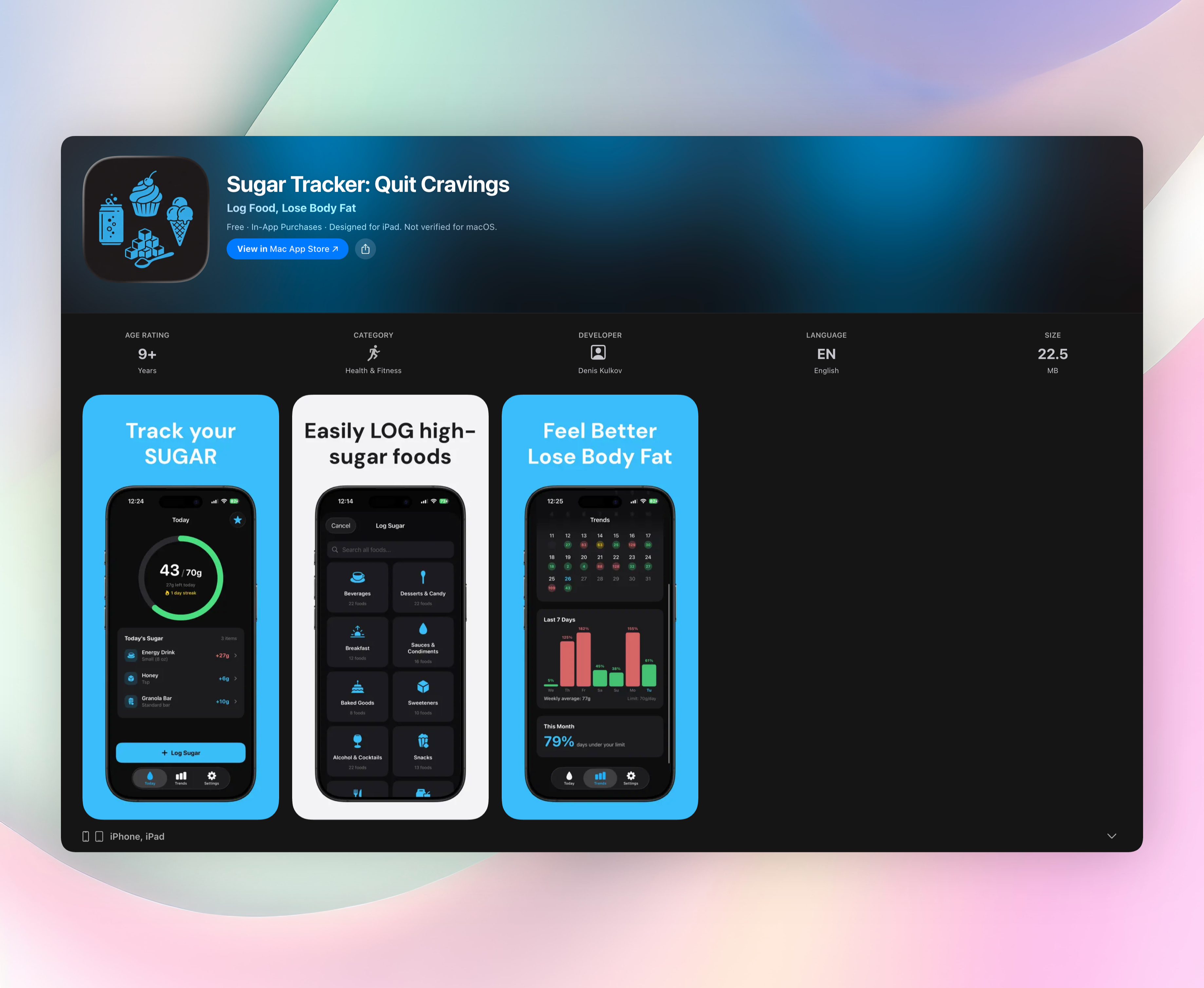
Sugar Tracker doesn’t ask for an email, show ads, or try to turn your health data into a social feed. It’s a stripped-down tool that sets a personalized daily added-sugar limit (based on WHO/AHA guidelines, gender, and age) and lets you tap to log grams as you eat. You won’t have to sift through a food database. The app shows common sources quickly, so logging takes seconds.
A craving-crushing feature stands out: a simple timer or counter that you start when a craving hits, helping you ride out the spike without mindlessly snacking. The home screen shows a progress ring that fills as you approach your limit. It goes from green to yellow to red, making it painfully obvious when you’re creeping over. No subscription, no paywalls, one purchase. It’s iOS-only and lightweight, built for daily use.
Standout features:
- One-tap logging with a visual ring that fills toward your daily limit, so you see exactly where you stand.
- Personalized daily added-sugar target, no guesswork.
- Craving timer to help you push through the tough moments.
- Zero data collection, no accounts, no ads — just a private tracker.
2. Sweet Dreams – Sugar Tracker
Best for: anyone already using a CGM who wants faster, more useful readings than the manufacturer’s app.
Sweet Dreams grabs data from FreeStyle Libre or Dexcom sensors and shows your current blood sugar, trend arrow, and recent history on a clean lock screen widget. No unlocking required. You can set custom high and low alarms that vibrate or sound even overnight, catching spikes or dips before they become problems. It’s straightforward: the app puts your most important numbers where you can see them at a glance, without extra health logging. The lock screen widget is the standout, turning a quick tap into a reading that’s always visible. Core features are free; premium unlocks longer historical views.
3. mySugr - Diabetes Tracker Log
Best for: people managing diabetes who’d rather tame a monster than fill out a spreadsheet.
mySugr wraps logging around a playful monster-taming game. You log meals, blood glucose, insulin, and activity, and your monster grows happier or crankier based on your numbers. It syncs with many glucometers, so manual entry drops. The app estimates your HbA1c as you go, giving a running forecast that keeps long-term averages top of mind. Freemium with a pro upgrade on Android. Standout: the HbA1c estimate that updates daily feels less abstract than a lab test every few months.
4. SNAQ - Diabetes Food Tracker
Best for: visual eaters who want carb counts from a photo, not a manual search.
SNAQ turns a meal photo into nutritional breakdowns (carb counts, fiber, protein) within seconds. Pair it with a glucose sensor and you can see exactly how that specific plate hit your blood sugar, creating a personal food-response map. No generic advice here; the app surfaces patterns like “your 2 p.m. salad spikes less than your 8 a.m. toast.” The photo-to-insight pipeline is the standout, helping you spot the foods your body actually struggles with. Freemium on Android, with sensor sync requiring a subscription.
5. Glucose Buddy Diabetes Tracker
Best for: data lovers and anyone who needs to walk into a doctor’s appointment with a polished report.
Glucose Buddy logs blood sugar, meals, medication, exercise, blood pressure, and weight in one place. The export-to-PDF feature generates charts and stats that a clinician can scan in seconds, no hunting through a raw log. You can set reminders so you never miss a check. Freemium on iOS, with the PDF export and deeper analytics behind a subscription. Standout is that formatted report, which turns scattered readings into a clear narrative for your healthcare provider.
6. Sugarfree Quit Sugar Addiction
Best for: people ready to go cold turkey on added sugar and curious about what withdrawal actually feels like.
Sugarfree runs a structured 14-Day Sugar-free Challenge with daily checkpoints. It tracks your sugar intake and, crucially, maps out common withdrawal symptoms like headaches, low energy, and mood swings, so you know what to expect on day three versus day seven. The symptom tracker normalizes the rough early phase, which helps prevent quit-fail spirals. iOS and freemium; the full challenge and personalized insights are unlocked with a subscription. Standout: the withdrawal timeline that prepares you mentally before the cravings hit hardest.
7. Sugarcut
Best for: label detectives who want to unmask hidden sugars with a barcode scanner and get a craving timeout button.
Sugarcut scans packaged food barcodes and calls out added sugar under any of its many aliases, including maltose, evaporated cane juice, barley malt, you name it. When a craving strikes, a panic button delivers a quick motivational quote or distraction prompt to break the impulse. Android and freemium; core scanning and the panic button are free, with some premium meal plans. Standout: the scanner paired with “hidden sugar” highlights turns you into a faster, smarter shopper.
8. Glucobyte
Best for: people who want their blood glucose data flowing into Apple Health without manual syncing.
Glucobyte reads from wireless glucose monitors and records, graphs, and trend-spots your levels. Sync with Apple Health means your doctor’s portal or fitness tracker can grab the numbers seamlessly. The trend analysis flags recurring patterns, like consistently high readings on Tuesday mornings after Monday-night takeout, so you can tweak your routine. iOS, freemium. Standout: the pattern recognition that goes beyond daily snapshots to show weekly rhythms.
9. Sukali
Best for: habit builders who need visual streaks and simple daily yes/no targets to cut hidden sugars.
Sukali scans meals and identifies hidden added sugar in sauces, dressings, and processed foods. It then ties findings to a streak-based habit system: each day you stay within a simple “sugar reduction” target, you keep your streak alive. Progress visuals and reminders reward consistency over perfection. The app feels like a coach that cares about momentum, not a robotic tracker. iOS, freemium. Standout: the streak counter combined with binary daily goals makes long-term sugar reduction less abstract and more gamified.
How we picked these apps
We installed and tested each app ourselves, looking for tools that actually help someone googling “sugar sensitivity.” We prioritized apps that open fast, log in under a minute, and don’t force an account. We ditched anything that stuck core features behind a hard paywall or pushed ads aggressively. We also made sure to cover the different needs: simple added-sugar tracking, CGM monitoring, photo-based carb counting, diabetes management, and habit formation. Privacy mattered. We favored apps that keep your health data on-device. The result is a shortlist that respects your time and your numbers.
Frequently asked questions
What’s the difference between tracking added sugar and tracking blood glucose?
Added-sugar tracking logs what you consume; blood glucose monitoring shows your body’s real-time sugar levels. The first helps you cut back on the source of sugar sensitivity issues, the second is essential for spotting dangerous spikes if you use a CGM or glucometer.
Is an app enough to manage sugar sensitivity, or do I need a doctor?
An app can build awareness and habit, but it’s not a diagnostic tool. If you experience symptoms like crashes, fatigue, or frequent thirst, get a medical checkup. Don’t rely solely on an app.
Are these apps free?
Most offer free basic features with optional paid upgrades. Sugar Tracker is a one-time purchase with no subscriptions or in-app upsells. Several apps have free tiers that cover logging, with premium features behind a paywall.
Which app is best if I don’t have a CGM?
Sugar Tracker and Sukali work without any device. You just log foods or scan meals. Sugar Tracker is the simplest way to log added sugar in seconds, no scanning or hardware required.
The verdict
Sugar Tracker is the app we keep on our home screen for sugar sensitivity. It’s fast, private, and stripped of the complexity medical apps layer on. If you just want to know how much added sugar you’re eating and blunt cravings, download it. Get Sugar Tracker
Related reviews
Best 9 Sugar Checks in 2026: Track, Cut & Balance
We compare 9 sugar check apps for iOS and Android, covering barcode scanning, meal scoring rules, Apple Watch support, and hidden sugar alerts to find your fit.
Best 9 Sugar Balances in 2026: Track Smart, Live Well
Compare 9 apps for sugar balance across iOS, Android, and wearables. We evaluate glucose logging, meal scoring rules, and CGM integration to find your fit.
Best 8 Sugar Counters in 2026: Track Intake Effortlessly
We compare 8 sugar counter apps on iOS and Android, evaluating barcode scanning, meal logging, wearable sync, and daily limit rules to find the best fit.