Best 8 Fermentation Schedules in 2026: Your Digital Baking Log
By Apps We Recommend
Introduction
Sourdough Tracker is the best app for managing a sourdough fermentation schedule without fuss, especially for starter upkeep. We tested 8 mobile apps that handle fermentation timelines across sourdough, brewing, vegetable ferments, and more. Each one earned its spot based on scheduling reliability and real-world usefulness.
Quick comparison table
| App | Best for | Platform | Standout feature | Price model |
|---|---|---|---|---|
| Sourdough Tracker | Forgetful sourdough bakers needing dead-simple starter maintenance | iOS | One-tap feeding with smart countdown timer | Free |
| Fermenta | Home fermenters juggling kimchi, kombucha, and sourdough | iOS, Android | Multi-batch dashboard with visual timelines | Freemium |
| Sourdough Lab | Bakers wanting a flexible schedule that adapts as you go | iOS | Adaptive algorithm that recalculates steps in real time | Paid |
| S.D Timer | Plan-ahead bakers who work backward from a desired bake time | iOS, Android | Temperature-adjusted countdown timer | Freemium |
| Brewfather | Serious homebrewers making beer, cider, or mead | iOS, Android | Smart-device integration that auto-logs fermentation data | Freemium |
| Fermolog | Mead and fruit wine makers needing visual timelines and ABV estimation | iOS | Real-time ABV calculator from logged gravity readings | Paid |
| Fermentapp | Beginners diving into vegetable lacto-fermentation | iOS, Android | Lacto-specific notifications that explain the “why” behind steps | Free |
| Sourdough Starter Tracker | Android users wanting a straightforward starter log without recipe clutter | Android | Health dashboard plotting starter vigor over time | Free |
1. Sourdough Tracker
Best for: forgetful sourdough bakers who need dead-simple starter maintenance without recipe clutter.
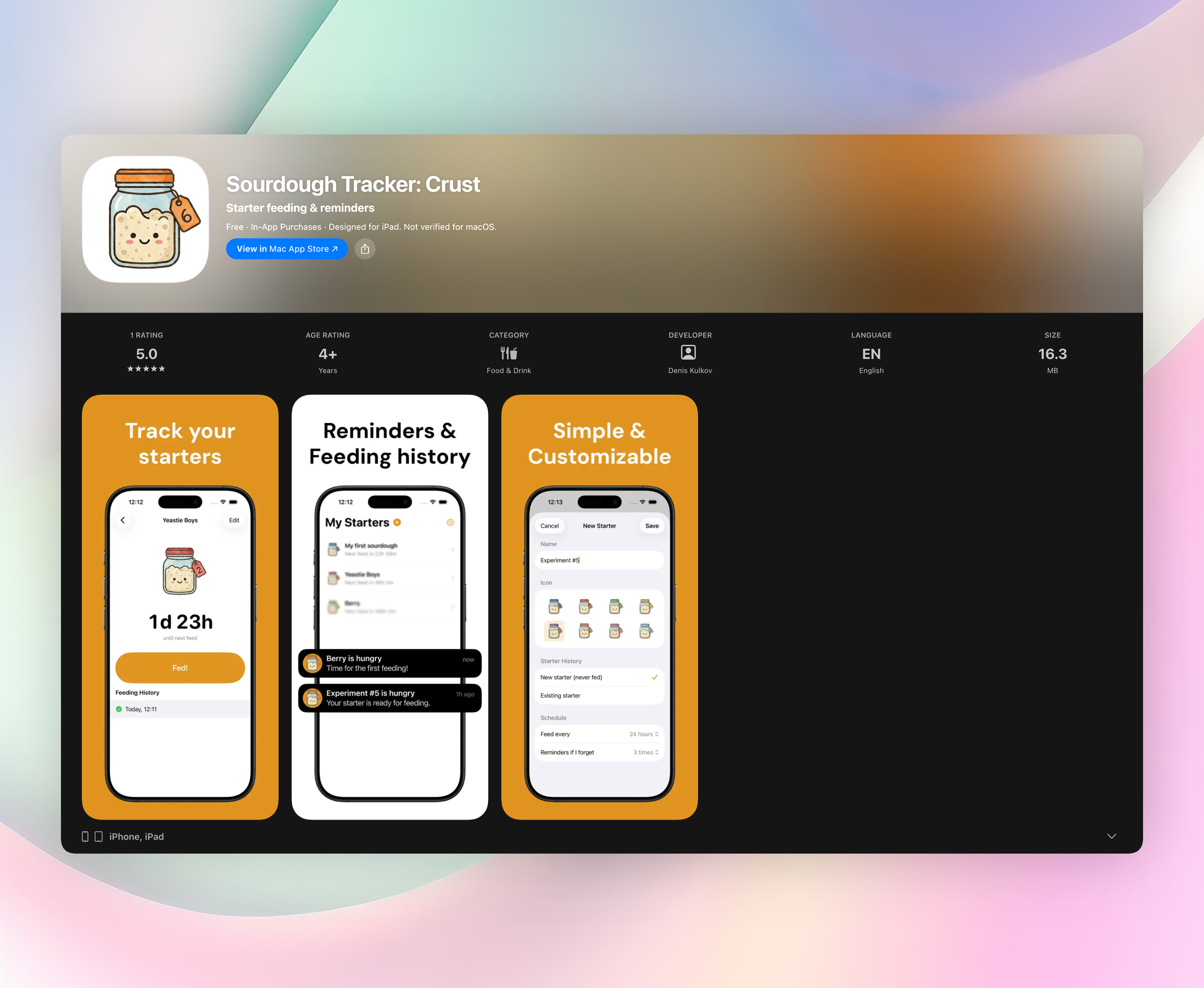
This app strips away the noise: no hydration calculators, crumb shots, or social feeds. It zeroes in on one thing, keeping your starter alive. Open the app, tap once to log a feeding, and it automatically calculates the next feeding window based on your starter’s rhythm. The reminder system pings you before your starter goes hungry, so you never bake with regret. You can add multiple starters with custom names and icons, pause them when you’re not baking, and scroll through a full feeding history at a glance. A cute mascot grows with each feeding, which sounds silly but actually makes maintenance feel less like a chore.
- One-tap feeding, just hit “Fed!” and the smart countdown resets
- Push notifications that remind you before feeding time, not after
- Multiple starters supported so you can track rye, white, or discard experiments separately
- Starter pausing for breaks between baking seasons
- Clean, uncluttered interface that takes 30 seconds to set up
2. Fermenta
Best for: home fermenters juggling multiple projects like kimchi, kombucha, and sourdough.
Fermenta tracks batches from start to finish with guided recipes and visual timelines dotted with checkpoints. Each recipe includes step-by-step instructions and push notifications for actions like burping jars or checking pH. The multi-batch dashboard shows all your active ferments in one glance, so you never lose track of what’s bubbling. Broad iOS and Android availability makes it accessible no matter which device you keep on the counter. Its strength lies in breadth. It won’t drill as deep on sourdough as a dedicated app, but it covers more ground for mixed-ferment households.
3. Sourdough Lab
Best for: bakers who want a flexible schedule that adapts in real time to their actual pace.
You input hydration percentage and target bulk fermentation time, and Sourdough Lab generates a step-by-step baking timeline. The real win is the dynamic adjustment. Finish stretch-and-folds early or get called away, and the app recalculates remaining steps on the fly. This effectively treats real life as part of the recipe, preventing over-proofing when your schedule slips. Available only on iOS, it suits intermediate bakers who don’t want a timer that shames them for straying off-script. The adaptive algorithm makes it feel like a coach, not a calendar.
4. S.D Timer
Best for: plan-ahead bakers who want to set a desired bake time and work backward to nail the schedule.
S.D Timer flips the planning around: tell it when you want to pull bread from the oven, and it calculates precisely when to feed your starter, autolyse, and shape. It adjusts based on ambient temperature, hydration, and flour type to make predictions more accurate than generic charts. Both iOS and Android users get the same core experience, a temperature-adjusted countdown timer that accounts for your kitchen’s actual warmth. It won’t hold your hand through technique, but for pure scheduling reliability, it’s a strong pick.
5. Brewfather
Best for: serious homebrewers crafting beer, cider, or mead who need an all-in-one fermentation command center.
Brewfather combines recipe building with inventory management, so you know what grains and hops you have before brew day. Detailed fermentation profiles track gravity, temperature, and step timing. Optional smart-device integration with Tilt or iSpindel auto-logs data to your phone. It runs on iOS and Android, syncing across devices. While it’s overkill for a simple lacto-ferment, it’s purpose-built for the multi-variable fermentation schedule of beer making. You get the precision homebrewers crave, backed by hardware that turns your phone into a brew partner.
6. Fermolog
Best for: mead and fruit wine makers looking for a visual timeline and easy ABV estimation.
Fermolog offers an adjustable timeline that shows fermentation stages and lets you drag checkpoints as progress dictates. Log hydrometer readings, and the automatic ABV estimator updates in real time, no manual math required. It reminds you of key steps like racking and bottling at the right intervals, which matters when ferments stretch for weeks. iOS only and built for small-batch experimental fermenters, it fills a narrow niche well. The visual approach makes the fermentation schedule feel tangible, not abstract.
7. Fermentapp
Best for: beginners diving into vegetable lacto-fermentation who want clear, educational guidance.
Fermentapp walks you through guided recipes for sauerkraut, kimchi, and tepache, breaking each process into timed steps with push notifications. What sets it apart is the safety notes woven into alerts, like why salt ratio matters and when burping prevents jar explosions. Both iOS and Android users can access it for free, making it a no-cost classroom. It doesn’t handle sourdough or beer, but for lacto novices, the fermentation schedule doubles as a quick-start course in food science.
8. Sourdough Starter Tracker
Best for: Android users who want a straightforward starter log without recipe features or social bells and whistles.
This app’s simple interface lets you log feedings with one tap and review a history of your starter’s upkeep. Smart reminders learn your typical feeding schedule and alert you before the starter peaks, which is especially helpful if you feed at odd hours. You can also record health metrics like bubble activity and rise quality, and the app turns those raw notes into a visual health trend over time. Android only, it fills a gap for non-iOS users who just need a reliable feeding diary to stick to their fermentation schedule.
How we picked these apps
We focused on apps that actively calculate fermentation timelines or trigger step-based notifications, not generic recipe apps or simple note-takers. Scheduling precision and reminder reliability were non-negotiable. We prioritized tools that handle real-world variables like temperature changes or missed steps gracefully, and we checked real-user reviews for consistency. Niche focus on specific fermentation stages (starter feeding, bulk ferment, racking) mattered more than broad feature lists. General kitchen timer apps didn’t make the cut unless they had dedicated scheduling logic and checkpoints for ferments.
Frequently asked questions
Can these apps replace a basic kitchen timer?
Many include built-in timers, but they go further by sequencing multiple steps and adjusting based on your progress or environment. They’re specialized for fermentation workflows, not a one-size-fits-all countdown for boiling pasta.
Do I need separate apps for sourdough, beer, and vegetables?
It depends on how complex your setup is. A sourdough timer won’t track beer gravity, and a brewing app won’t know your kimchi schedule. Fermenta covers multiple types fairly well, but dedicated apps like Sourdough Tracker nail their niche with less clutter.
Are these apps reliable for long-term ferments?
Yes, the ones that learn your patterns or integrate with smart sensors tend to be most reliable over weeks-long schedules. Simple reminder-based apps can also work if you consistently log actions, but they won’t self-correct if you miss a step.
The verdict
Sourdough Tracker: Crust is the best app for anyone who’s ever killed a starter or missed a feeding window. While other apps on this list shine for kombucha, beer, and lacto-ferments, Sourdough Tracker solves the most common pain point: keeping a starter alive without fuss. If you’re tired of the guilt that comes with a neglected jar, Get Sourdough Tracker and bake with confidence again.
Related reviews
Best 9 Fermentation Monitors in 2026: Track Every Bubble
We compare 9 fermentation monitor apps across platforms, sensor integrations, and logging depth. Find the right tool for sourdough, kombucha, beer, and more.
Best 9 Starter Feeding Schedules in 2026: Rise to Every Bake
Compare 9 starter feeding schedule apps for 2026, from smart reminders to ratio calculators. Find the best tool for hydration tracking, push notifications, and watch support.
Best 9 Digital Snooker Scoreboards in 2026: Track Every Frame
Compare 9 digital snooker scoreboard apps for platform support, watch compatibility, scoring rules, and stats tracking to find the right fit.